Releases

We're constantly improving piplanning.io. Browse the complete history of updates, enhancements, and new features across all past releases.
Filter by topic:

Kanban Mode

Kanban support has arrived in Execution Mode, making Agile collaboration more seamless than ever. This new feature allows teams to start managing their work in a fully Jira-synced Kanban board.
Mar 19th, 2025

Kanban Mode

Kanban support has arrived in Execution Mode, making Agile collaboration more seamless than ever. This new feature allows teams to start managing their work in a fully Jira-synced Kanban board.
Mar 19th, 2025

Pan Mode & New Utilities

You’ll find the Utilities menu in the lower-right corner, making key board functions like adding sticky notes, scaling, zooming, and the new Pan Mode easier to access. With Pan Mode, effortlessly navigate your board using the hand icon or by holding the spacebar and dragging. Selecting multiple sticky notes is now smoother, too. Plus, the Plan vs. Execution switch is now right next to your profile for quicker toggling.
Feb 28th, 2025

Pan Mode & New Utilities

You’ll find the Utilities menu in the lower-right corner, making key board functions like adding sticky notes, scaling, zooming, and the new Pan Mode easier to access. With Pan Mode, effortlessly navigate your board using the hand icon or by holding the spacebar and dragging. Selecting multiple sticky notes is now smoother, too. Plus, the Plan vs. Execution switch is now right next to your profile for quicker toggling.
Feb 28th, 2025

Org View and Session change

Clicking on the logo in the top navgiation opens your org structure and allows you to switch easily your PI sessions
Dec 10th, 2024

Org View and Session change

Clicking on the logo in the top navgiation opens your org structure and allows you to switch easily your PI sessions
Dec 10th, 2024

Load Warning and Capacity Limit Threshold

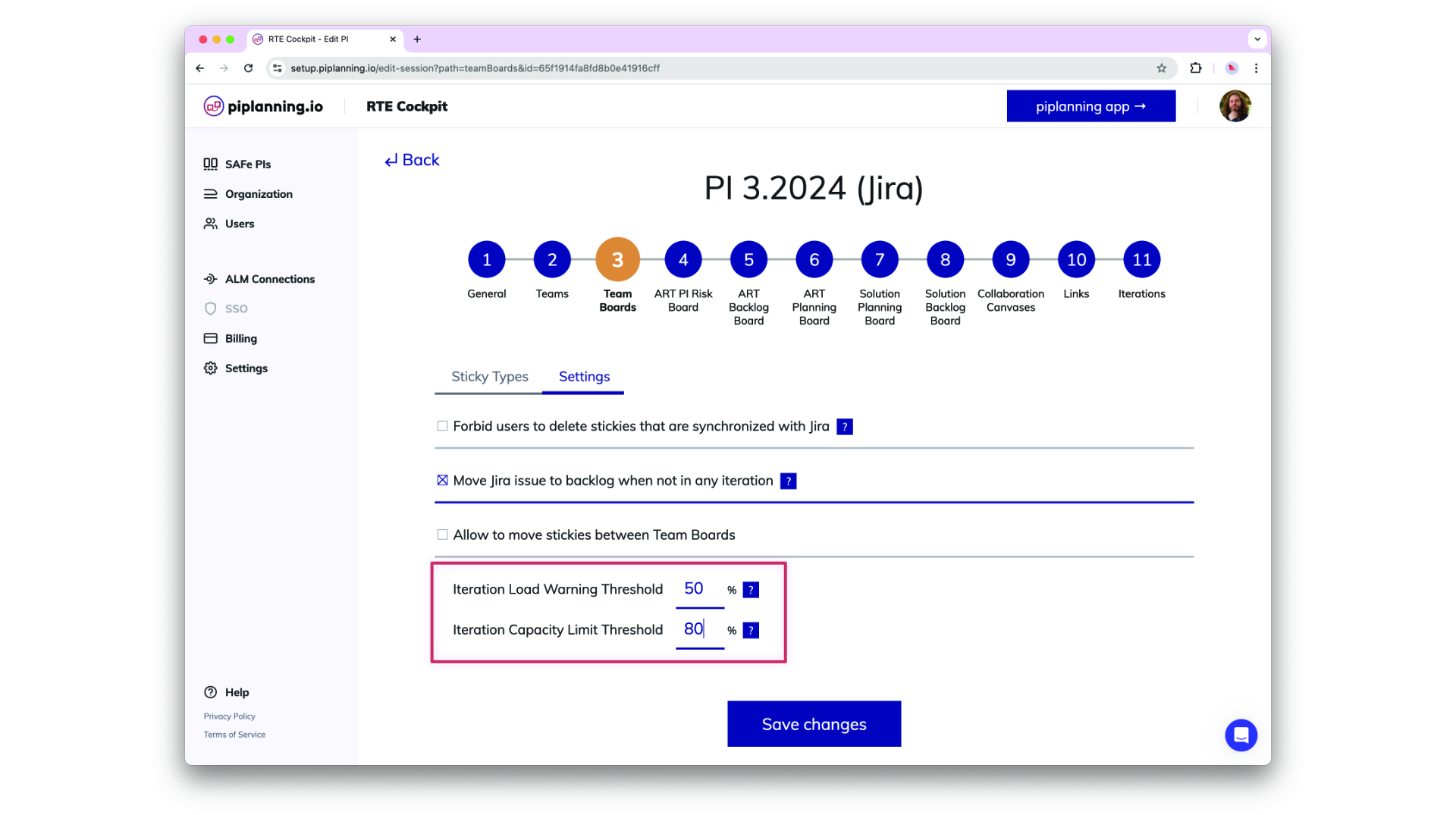
Load Warning and Capacity Limit Theshol are now configurable in the RTE Cockpit under the Team Board configuration
Dec 2nd, 2024

Load Warning and Capacity Limit Threshold

Load Warning and Capacity Limit Theshol are now configurable in the RTE Cockpit under the Team Board configuration
Dec 2nd, 2024

Copy Canvases

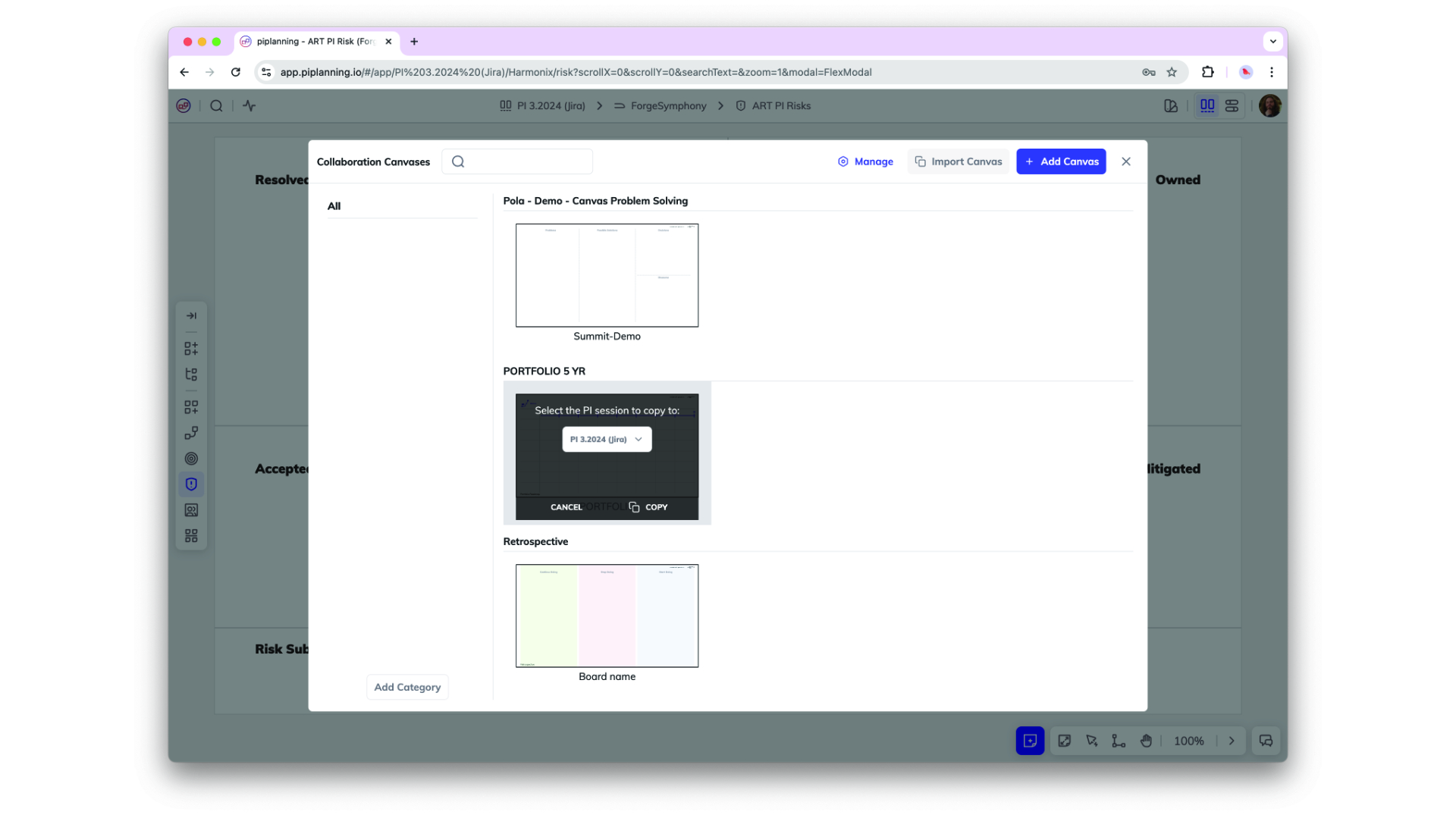
Canvases can now be copied from one session to another. That allows you to create templates and re-use them in future PI sessions.
Nov 25th, 2024

Copy Canvases

Canvases can now be copied from one session to another. That allows you to create templates and re-use them in future PI sessions.
Nov 25th, 2024

Assignee on Risk Board

You can now assign work items on a risk board to a person.
Nov 21st, 2024

Assignee on Risk Board

You can now assign work items on a risk board to a person.
Nov 21st, 2024

Release version 2.18.0

This release includes all the features from previous Cloud releases.
Nov 20th, 2024

Release version 2.18.0

This release includes all the features from previous Cloud releases.
Nov 20th, 2024

Updated Permissions for PI-Admin Role in ARTs and Solution Trains

PI-Admins can now be assigned to specific ARTs and Solution Trains (STs), extending their permissions to manage teams, ARTs, and STs based on their assignments. This change enhances control over visibility and editing capabilities in the RTE Cockpit. Important: When a user’s role is modified, the system retains their ART/ST associations but adjusts permissions accordingly. Please be aware that this is a breaking change, and further guidance on managing these new permissions will be provided in our documentation.
Nov 6th, 2024

Updated Permissions for PI-Admin Role in ARTs and Solution Trains

PI-Admins can now be assigned to specific ARTs and Solution Trains (STs), extending their permissions to manage teams, ARTs, and STs based on their assignments. This change enhances control over visibility and editing capabilities in the RTE Cockpit. Important: When a user’s role is modified, the system retains their ART/ST associations but adjusts permissions accordingly. Please be aware that this is a breaking change, and further guidance on managing these new permissions will be provided in our documentation.
Nov 6th, 2024

Automatic Logout After Inactivity

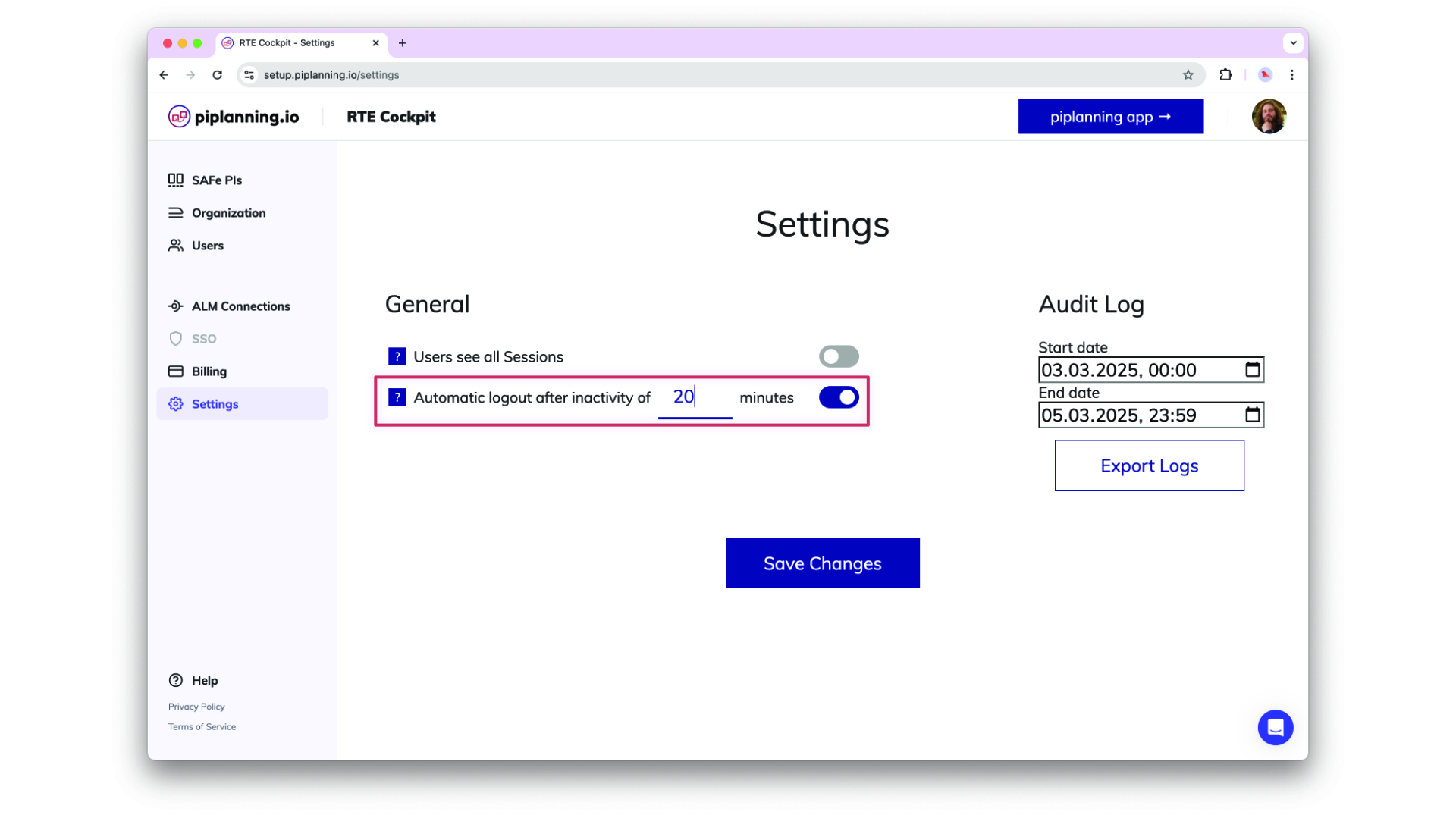
Helping organizsations meet compliance needs, admins can optionally adjust an inactivity timeout in the cockpit settings after which users get automatically logged out. This functionality detects mouse and keyboard activity, ensuring that only active sessions remain logged in.
Oct 24th, 2024

Automatic Logout After Inactivity

Helping organizsations meet compliance needs, admins can optionally adjust an inactivity timeout in the cockpit settings after which users get automatically logged out. This functionality detects mouse and keyboard activity, ensuring that only active sessions remain logged in.
Oct 24th, 2024

Sticky Linking and Search Capabilities

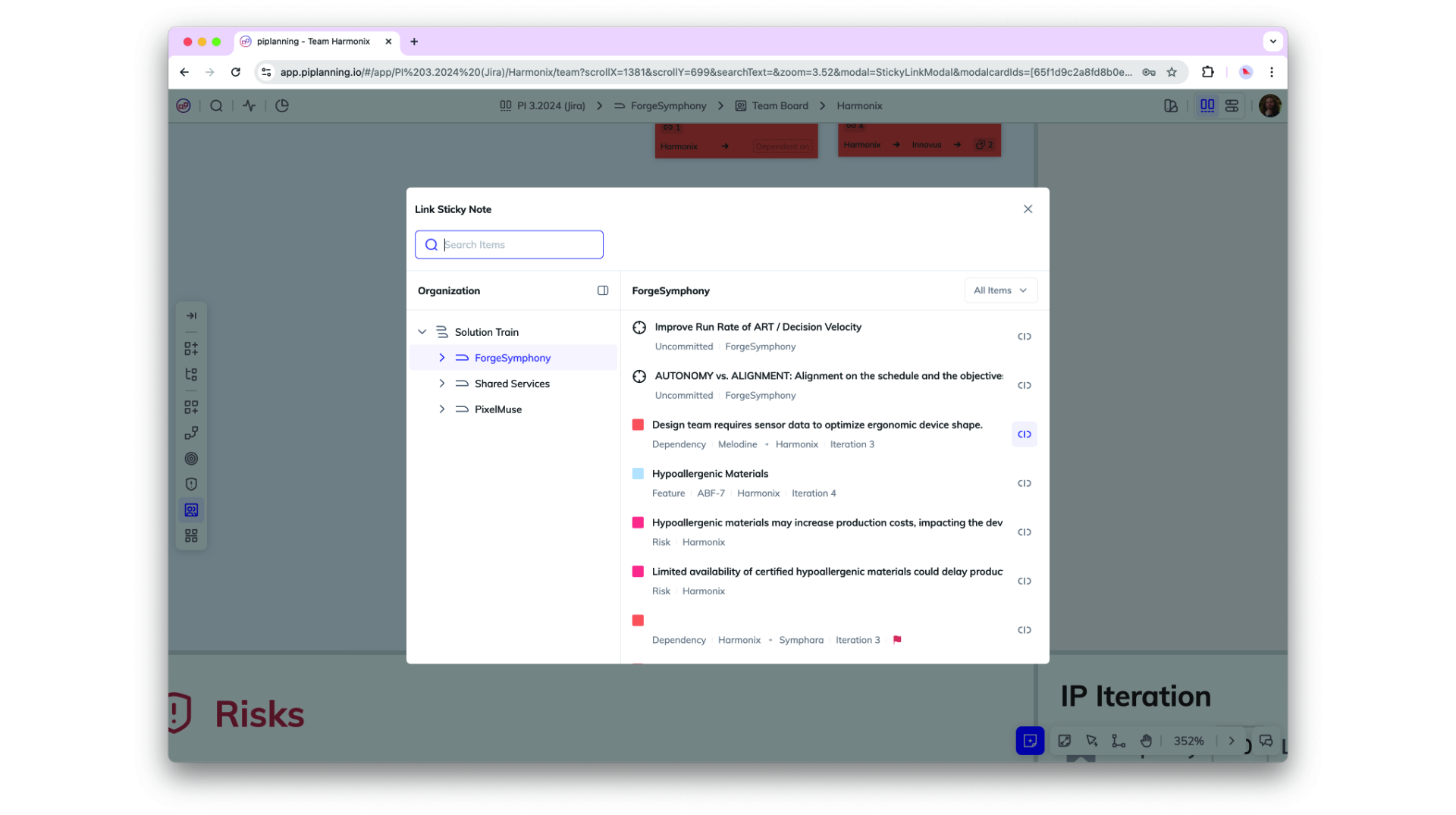
You can now link any sticky note to another within the same PI session, allowing for better cross-team and cross-ART (Agile Release Train) collaboration. Easily link stories within or across teams, as well as to features in other ARTs, with an improved UI that includes team and type filtering plus full-text search for streamlined navigation.
Oct 2nd, 2024

Sticky Linking and Search Capabilities

You can now link any sticky note to another within the same PI session, allowing for better cross-team and cross-ART (Agile Release Train) collaboration. Easily link stories within or across teams, as well as to features in other ARTs, with an improved UI that includes team and type filtering plus full-text search for streamlined navigation.
Oct 2nd, 2024

Enhance ART Backlog Board synch filtering by more fields

ART backlog issues in Jira can now be filtered by additional field types beyond labels, these are FixVersion, Component, Single-select (customfield), and Multi-select (customfield). This does simplify your configuration and providing greater flexibility in synchronizing your ART backlog.
Sep 18th, 2024

Enhance ART Backlog Board synch filtering by more fields

ART backlog issues in Jira can now be filtered by additional field types beyond labels, these are FixVersion, Component, Single-select (customfield), and Multi-select (customfield). This does simplify your configuration and providing greater flexibility in synchronizing your ART backlog.
Sep 18th, 2024

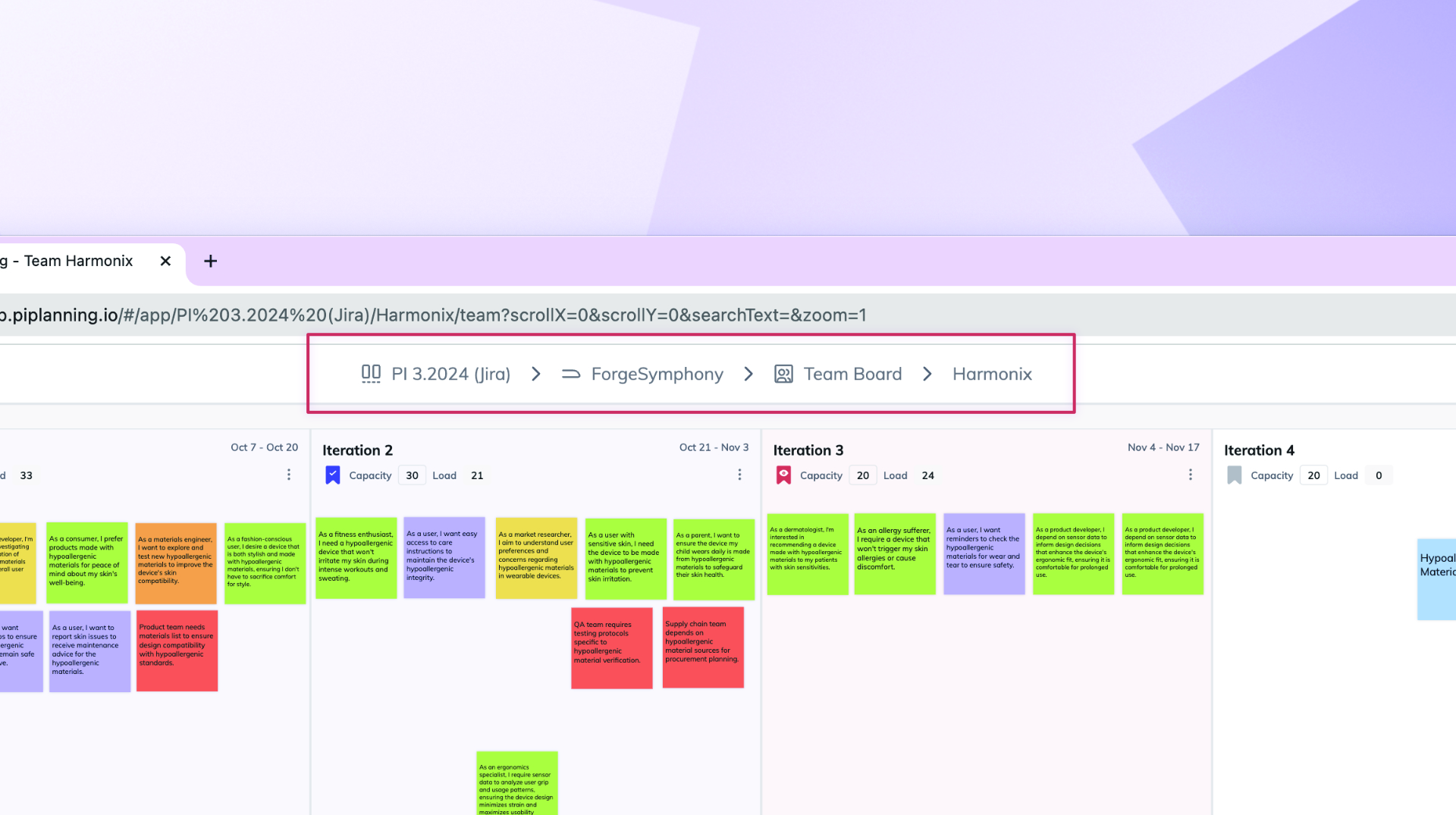
Enhanced Team and ART Navigation

Navigating between Teams and ARTs is now simpler with the new ART selector on team boards and a Team selector on ART and Solution Boards. Additionally, when you leave an ART and return, you’ll automatically rejoin as the same team you left, making it easier to pick up where you left off.
May 21st, 2024

Enhanced Team and ART Navigation

Navigating between Teams and ARTs is now simpler with the new ART selector on team boards and a Team selector on ART and Solution Boards. Additionally, when you leave an ART and return, you’ll automatically rejoin as the same team you left, making it easier to pick up where you left off.
May 21st, 2024

Jira Assignees Synced to piplanning.io Sticky Notes

Now, when you sync sticky notes from Jira to piplanning.io, the assignee information is automatically transferred. This ensures that every team member can see at a glance who is responsible for each task, facilitating better coordination and accountability across your Agile Release Train. Enjoy a more connected planning experience.
Apr 20th, 2024

Jira Assignees Synced to piplanning.io Sticky Notes

Now, when you sync sticky notes from Jira to piplanning.io, the assignee information is automatically transferred. This ensures that every team member can see at a glance who is responsible for each task, facilitating better coordination and accountability across your Agile Release Train. Enjoy a more connected planning experience.
Apr 20th, 2024

StickyNote Pro

The StickyNote Pro isn't just a new tool – it changes the way we work. It comes in many types and colors, all designed to fit your unique way of working. But no matter how you use it, its simplicity remains the same. Simplicity is what we're all about.
Apr 9th, 2024

StickyNote Pro

The StickyNote Pro isn't just a new tool – it changes the way we work. It comes in many types and colors, all designed to fit your unique way of working. But no matter how you use it, its simplicity remains the same. Simplicity is what we're all about.
Apr 9th, 2024

Keep Filters

If you want to close the search but keep the filter active in order to work on the board, click on "Keep Filters & Close". To clear the filter, click on the X in the top navigation on the left.
Mar 1st, 2024

Keep Filters

If you want to close the search but keep the filter active in order to work on the board, click on "Keep Filters & Close". To clear the filter, click on the X in the top navigation on the left.
Mar 1st, 2024

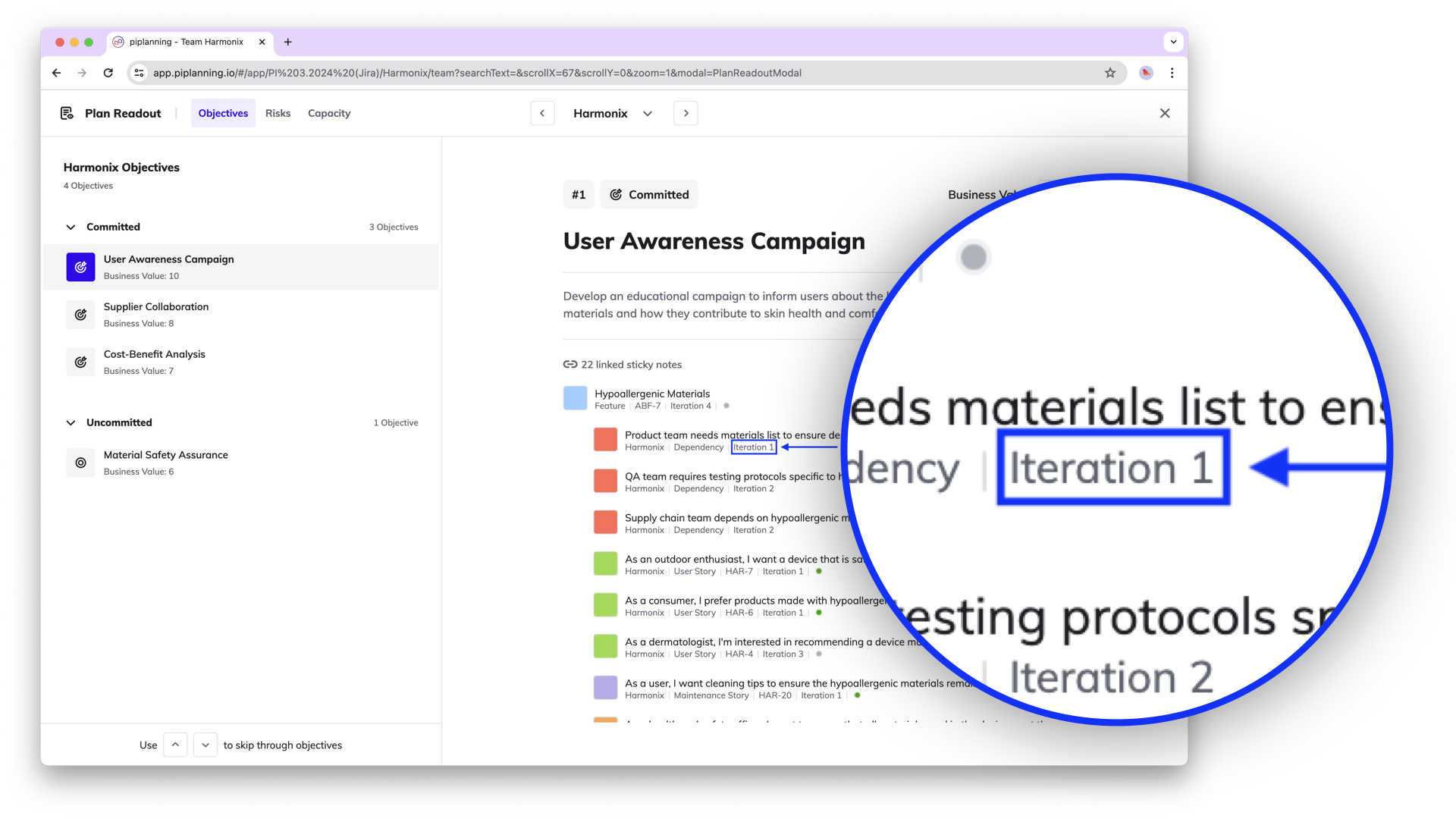
Planned Iteration Visible in Plan Readout

The Plan Readout overview now also shows the iteration in which the work items linked to the team objective were planned.
Feb 7th, 2024

Planned Iteration Visible in Plan Readout

The Plan Readout overview now also shows the iteration in which the work items linked to the team objective were planned.
Feb 7th, 2024

History of Sticky Notes - Tracking Activities

The sticky note activity overview allows you to see what has happened to a sticky note since it was created. Who changed what and when. This helps with traceability.
Dec 13th, 2023

History of Sticky Notes - Tracking Activities

The sticky note activity overview allows you to see what has happened to a sticky note since it was created. Who changed what and when. This helps with traceability.
Dec 13th, 2023

Mirror Dependency to Solution Planning Board

Efficiently manage cross-ART dependencies with the ability to mirror them onto the Solution Planning Board. When a team faces dependencies with another team in a different ART, reflecting these dependencies at the solution level ensures clear visibility and facilitates easy tracking across multiple ARTs.
Nov 8th, 2023

Mirror Dependency to Solution Planning Board

Efficiently manage cross-ART dependencies with the ability to mirror them onto the Solution Planning Board. When a team faces dependencies with another team in a different ART, reflecting these dependencies at the solution level ensures clear visibility and facilitates easy tracking across multiple ARTs.
Nov 8th, 2023

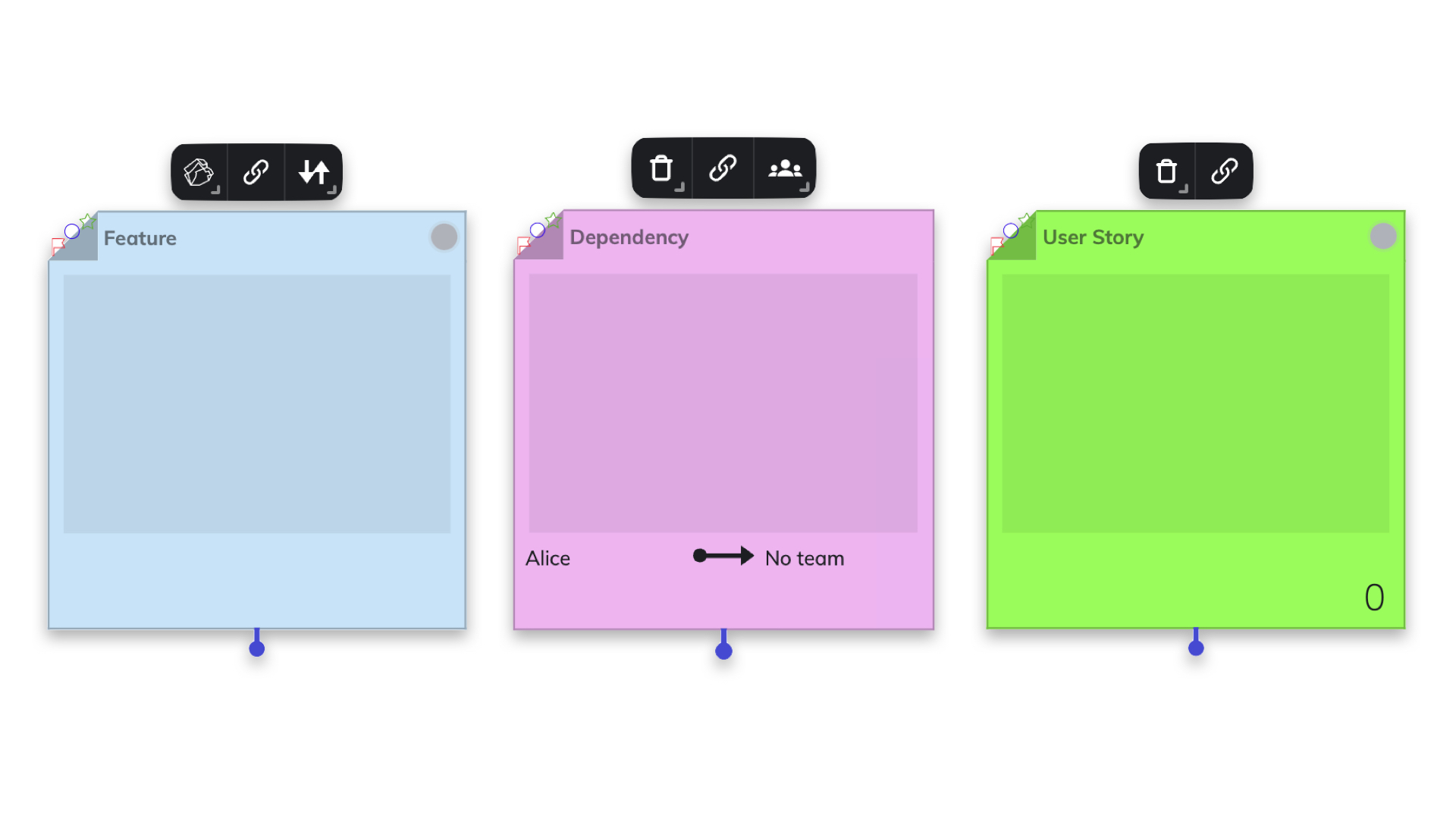
Redesigned Sticky Notes

Discover a polished new look for sticky notes! Our revamped design places the navigation menu at the top, enhancing user experience. Effortlessly access essential functions tailored to the specific type of sticky note.
Oct 25th, 2023

Redesigned Sticky Notes

Discover a polished new look for sticky notes! Our revamped design places the navigation menu at the top, enhancing user experience. Effortlessly access essential functions tailored to the specific type of sticky note.
Oct 25th, 2023

Efficient Multi-Sticky Note Copy-Paste

Introducing the power of swift copy-paste with multiple sticky notes at once! Enhance your workflow by seamlessly duplicating and transferring information across several sticky notes in one go.
Oct 25th, 2023

Efficient Multi-Sticky Note Copy-Paste

Introducing the power of swift copy-paste with multiple sticky notes at once! Enhance your workflow by seamlessly duplicating and transferring information across several sticky notes in one go.
Oct 25th, 2023

New Plan Readout Functionality

In Draft or Final Plan Readout, you can review the key planning outputs (PI Objectives, capacity and load, risks) easily in a new dedicated space. It offers quick access and aids in the tight timebox. Moreover it allows Business Owners to assign Business Value for Objectives.
Sep 19th, 2023

New Plan Readout Functionality

In Draft or Final Plan Readout, you can review the key planning outputs (PI Objectives, capacity and load, risks) easily in a new dedicated space. It offers quick access and aids in the tight timebox. Moreover it allows Business Owners to assign Business Value for Objectives.
Sep 19th, 2023

Infinite loading on users page

If you scroll down it will automatically load and display more users.
Apr 30th, 2021

Infinite loading on users page

If you scroll down it will automatically load and display more users.
Apr 30th, 2021

Rally releases for Backlog Board

For the Program Backlog Board you can now filter your features by releases. So only the features that are in a specific release will be reflected in the piplanning app on the Program Backlog Board.
Apr 20th, 2021

Rally releases for Backlog Board

For the Program Backlog Board you can now filter your features by releases. So only the features that are in a specific release will be reflected in the piplanning app on the Program Backlog Board.
Apr 20th, 2021

Set order for team on Program Board

You can now set your own preferred order for the teams on the Program Board. Just arrange them the way you want. This can help you to optimize the dependency visualization as you can place teams that have many dependencies to other teams in the center of the board.
Mar 22nd, 2021

Set order for team on Program Board

You can now set your own preferred order for the teams on the Program Board. Just arrange them the way you want. This can help you to optimize the dependency visualization as you can place teams that have many dependencies to other teams in the center of the board.
Mar 22nd, 2021

Press save for all the changes

We have made it consistent that you always have to press save when you change something in the configuration.
Mar 11th, 2021

Press save for all the changes

We have made it consistent that you always have to press save when you change something in the configuration.
Mar 11th, 2021

Duplicate session

Want to be really fast when preparing your next PI Planning? Simply duplicate a previous session with all the configuration including sticky types and ALM configuration. This way you are ready for PI Planning within a few minutes.
Feb 11th, 2021

Duplicate session

Want to be really fast when preparing your next PI Planning? Simply duplicate a previous session with all the configuration including sticky types and ALM configuration. This way you are ready for PI Planning within a few minutes.
Feb 11th, 2021

December / January Cloud feature overview

Learn in this video what we released in December 2020 and January 2021 for the RTE Cockpit in piplanning.io.
Feb 8th, 2021

December / January Cloud feature overview

Learn in this video what we released in December 2020 and January 2021 for the RTE Cockpit in piplanning.io.
Feb 8th, 2021

RTE Cockpit ↔️ piplanning app

If you are logged in as an admin you can switch with two clicks to the RTE Cockpit and with one click back. In piplanning.io go to Settings and click “RTE Cockpit”. In the RTE Cockpit click in the upper left on “Switch to piplanning app”.
Jan 21st, 2021

RTE Cockpit ↔️ piplanning app

If you are logged in as an admin you can switch with two clicks to the RTE Cockpit and with one click back. In piplanning.io go to Settings and click “RTE Cockpit”. In the RTE Cockpit click in the upper left on “Switch to piplanning app”.
Jan 21st, 2021

Configure canvases

Need another canvas or a different sticky type. Click on the small button “Manage” and get directly to the Canvases configuration page.
Dec 16th, 2020

Configure canvases

Need another canvas or a different sticky type. Click on the small button “Manage” and get directly to the Canvases configuration page.
Dec 16th, 2020

November Cloud feature overview

Learn in this video what we released in November 2020 for the Cloud piplanning app.
Dec 10th, 2020

November Cloud feature overview

Learn in this video what we released in November 2020 for the Cloud piplanning app.
Dec 10th, 2020

October Cloud feature overview

Learn in this video what we released in October 2020 for the Cloud piplanning app.
Nov 5th, 2020

October Cloud feature overview

Learn in this video what we released in October 2020 for the Cloud piplanning app.
Nov 5th, 2020

Release version 2.18.0

This release includes all the features from previous Cloud releases.
Nov 20th, 2024

Release version 2.18.0

This release includes all the features from previous Cloud releases.
Nov 20th, 2024

Release version 2.17.0

This release includes all the features from previous Cloud releases.
Jun 25th, 2024

Release version 2.17.0

This release includes all the features from previous Cloud releases.
Jun 25th, 2024

Release version 2.16.0

This release includes all the features from previous Cloud releases.
May 16th, 2024

Release version 2.16.0

This release includes all the features from previous Cloud releases.
May 16th, 2024

Release version 2.15.0

This release includes all the features from previous Cloud releases.
Feb 6th, 2024

Release version 2.15.0

This release includes all the features from previous Cloud releases.
Feb 6th, 2024

Release version 2.14.0

This release includes all the features from previous Cloud releases.
May 24th, 2023

Release version 2.14.0

This release includes all the features from previous Cloud releases.
May 24th, 2023

Release version 2.12

This release includes all the features from previous Cloud releases.
Feb 16th, 2022

Release version 2.12

This release includes all the features from previous Cloud releases.
Feb 16th, 2022

Release version 2.11

This release includes all the features from previous Cloud releases.
Dec 28th, 2021

Release version 2.11

This release includes all the features from previous Cloud releases.
Dec 28th, 2021

Release version 2.10

This release includes all the features from previous Cloud releases.
Nov 17th, 2021

Release version 2.10

This release includes all the features from previous Cloud releases.
Nov 17th, 2021

Release version 2.9

This release includes all the features from previous Cloud releases.
Jul 7th, 2021

Release version 2.9

This release includes all the features from previous Cloud releases.
Jul 7th, 2021

Release version 2.3

This release includes all the features from previous Cloud releases.
May 19th, 2021

Release version 2.3

This release includes all the features from previous Cloud releases.
May 19th, 2021