Releases

We're constantly improving piplanning.io. Browse the complete history of updates, enhancements, and new features across all past releases.
Filter by topic:

Smoother board zoom

You can enjoy a smooth and snappy zoom in and out transition on the board. There is no lag when you have a lot (400+ items) of sticky notes on the board.
May 12th, 2021

Smoother board zoom

You can enjoy a smooth and snappy zoom in and out transition on the board. There is no lag when you have a lot (400+ items) of sticky notes on the board.
May 12th, 2021

Shortcuts for search on boards

To search on the board for stickers use control + F as a shortcut on your keyboard. For filtering the boards for teams use control + T. If you want to filter for a specific sticky type press control + Y. Be aware: Depending on your system instead of “control” the shortcuts might only work with “option” or “command”.
May 3rd, 2021

Shortcuts for search on boards

To search on the board for stickers use control + F as a shortcut on your keyboard. For filtering the boards for teams use control + T. If you want to filter for a specific sticky type press control + Y. Be aware: Depending on your system instead of “control” the shortcuts might only work with “option” or “command”.
May 3rd, 2021

Infinite loading on users page

If you scroll down it will automatically load and display more users.
Apr 30th, 2021

Infinite loading on users page

If you scroll down it will automatically load and display more users.
Apr 30th, 2021

Rally releases for Backlog Board

For the Program Backlog Board you can now filter your features by releases. So only the features that are in a specific release will be reflected in the piplanning app on the Program Backlog Board.
Apr 20th, 2021

Rally releases for Backlog Board

For the Program Backlog Board you can now filter your features by releases. So only the features that are in a specific release will be reflected in the piplanning app on the Program Backlog Board.
Apr 20th, 2021

Set order for team on Program Board

You can now set your own preferred order for the teams on the Program Board. Just arrange them the way you want. This can help you to optimize the dependency visualization as you can place teams that have many dependencies to other teams in the center of the board.
Mar 22nd, 2021

Set order for team on Program Board

You can now set your own preferred order for the teams on the Program Board. Just arrange them the way you want. This can help you to optimize the dependency visualization as you can place teams that have many dependencies to other teams in the center of the board.
Mar 22nd, 2021

Search for multiple sticky types / teams / stickers

When you need to look for a particular sticky note on the board, you can set up multiple search criteria at once such as sticky type, teams or stickers.
Mar 11th, 2021

Search for multiple sticky types / teams / stickers

When you need to look for a particular sticky note on the board, you can set up multiple search criteria at once such as sticky type, teams or stickers.
Mar 11th, 2021

Press save for all the changes

We have made it consistent that you always have to press save when you change something in the configuration.
Mar 11th, 2021

Press save for all the changes

We have made it consistent that you always have to press save when you change something in the configuration.
Mar 11th, 2021

Release version 2.8

This release includes all the features from previous Cloud releases.
Mar 5th, 2021

Release version 2.8

This release includes all the features from previous Cloud releases.
Mar 5th, 2021

New canvases available

The accessible canvases have been expanded to include Customer Journey Map, ROAM Kanban, Golden Circle and User Story Map.
Feb 15th, 2021

New canvases available

The accessible canvases have been expanded to include Customer Journey Map, ROAM Kanban, Golden Circle and User Story Map.
Feb 15th, 2021

Duplicate session

Want to be really fast when preparing your next PI Planning? Simply duplicate a previous session with all the configuration including sticky types and ALM configuration. This way you are ready for PI Planning within a few minutes.
Feb 11th, 2021

Duplicate session

Want to be really fast when preparing your next PI Planning? Simply duplicate a previous session with all the configuration including sticky types and ALM configuration. This way you are ready for PI Planning within a few minutes.
Feb 11th, 2021

Filter for "no team" sticky notes

Now it’s possible to highlight sticky notes that are not assigned to a team.
Feb 10th, 2021

Filter for "no team" sticky notes

Now it’s possible to highlight sticky notes that are not assigned to a team.
Feb 10th, 2021

Kanban Mode

Kanban support has arrived in Execution Mode, making Agile collaboration more seamless than ever. This new feature allows teams to start managing their work in a fully Jira-synced Kanban board.
Mar 19th, 2025

Kanban Mode

Kanban support has arrived in Execution Mode, making Agile collaboration more seamless than ever. This new feature allows teams to start managing their work in a fully Jira-synced Kanban board.
Mar 19th, 2025

Pan Mode & New Utilities

You’ll find the Utilities menu in the lower-right corner, making key board functions like adding sticky notes, scaling, zooming, and the new Pan Mode easier to access. With Pan Mode, effortlessly navigate your board using the hand icon or by holding the spacebar and dragging. Selecting multiple sticky notes is now smoother, too. Plus, the Plan vs. Execution switch is now right next to your profile for quicker toggling.
Feb 28th, 2025

Pan Mode & New Utilities

You’ll find the Utilities menu in the lower-right corner, making key board functions like adding sticky notes, scaling, zooming, and the new Pan Mode easier to access. With Pan Mode, effortlessly navigate your board using the hand icon or by holding the spacebar and dragging. Selecting multiple sticky notes is now smoother, too. Plus, the Plan vs. Execution switch is now right next to your profile for quicker toggling.
Feb 28th, 2025

Org View and Session change

Clicking on the logo in the top navgiation opens your org structure and allows you to switch easily your PI sessions
Dec 10th, 2024

Org View and Session change

Clicking on the logo in the top navgiation opens your org structure and allows you to switch easily your PI sessions
Dec 10th, 2024

Copy Canvases

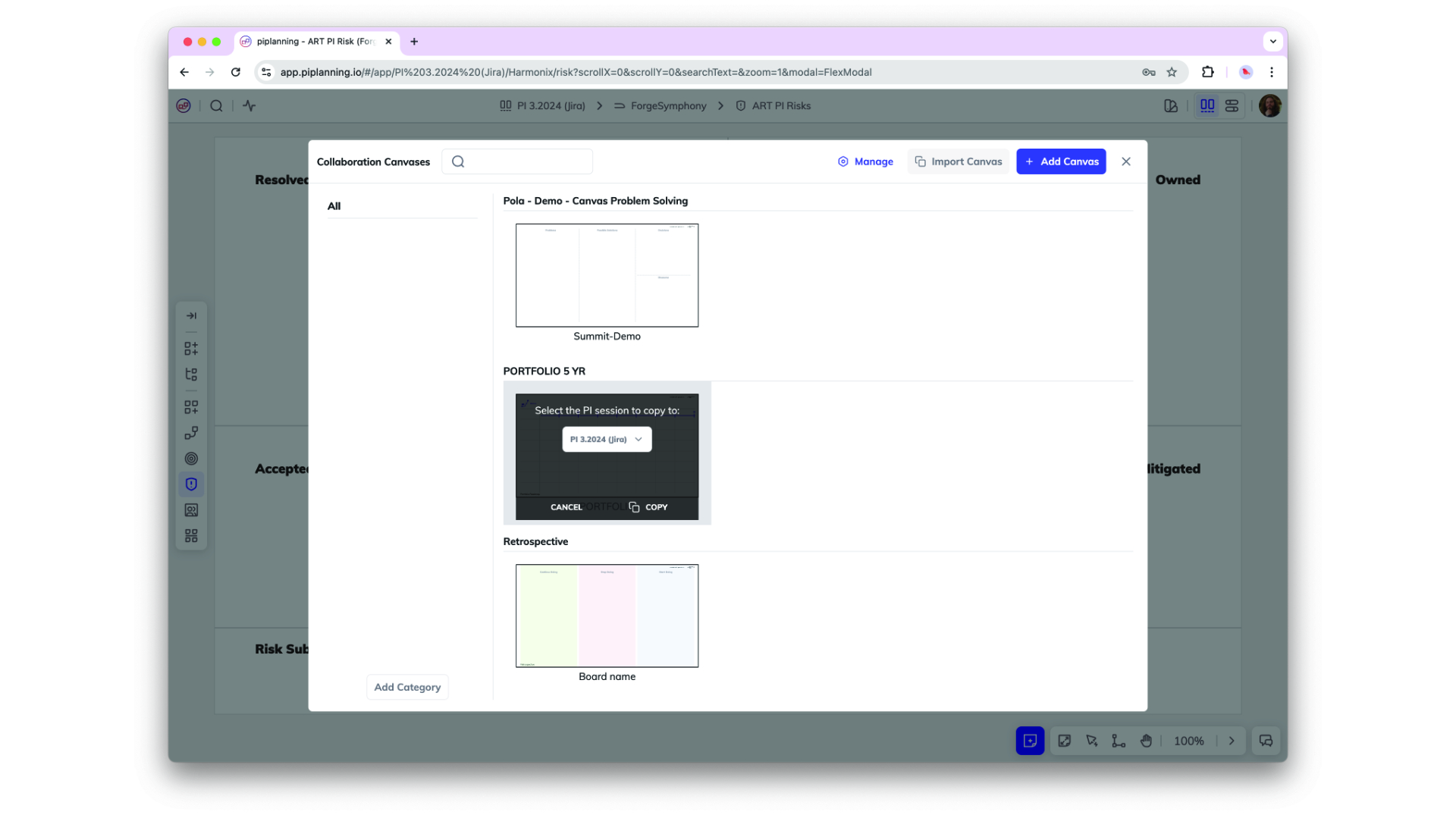
Canvases can now be copied from one session to another. That allows you to create templates and re-use them in future PI sessions.
Nov 25th, 2024

Copy Canvases

Canvases can now be copied from one session to another. That allows you to create templates and re-use them in future PI sessions.
Nov 25th, 2024

Assignee on Risk Board

You can now assign work items on a risk board to a person.
Nov 21st, 2024

Assignee on Risk Board

You can now assign work items on a risk board to a person.
Nov 21st, 2024

Sticky Linking and Search Capabilities

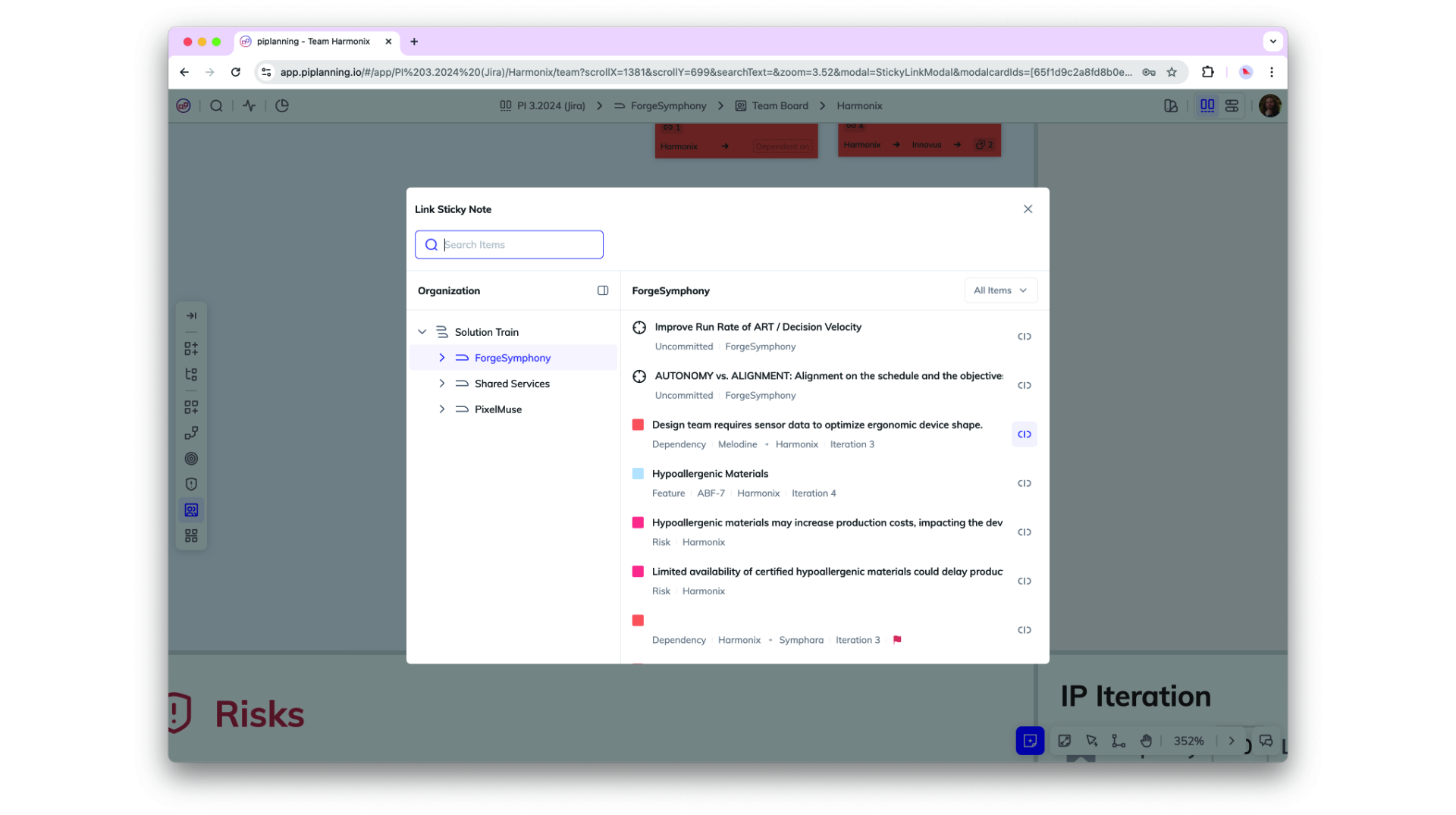
You can now link any sticky note to another within the same PI session, allowing for better cross-team and cross-ART (Agile Release Train) collaboration. Easily link stories within or across teams, as well as to features in other ARTs, with an improved UI that includes team and type filtering plus full-text search for streamlined navigation.
Oct 2nd, 2024

Sticky Linking and Search Capabilities

You can now link any sticky note to another within the same PI session, allowing for better cross-team and cross-ART (Agile Release Train) collaboration. Easily link stories within or across teams, as well as to features in other ARTs, with an improved UI that includes team and type filtering plus full-text search for streamlined navigation.
Oct 2nd, 2024

Connection Status Page

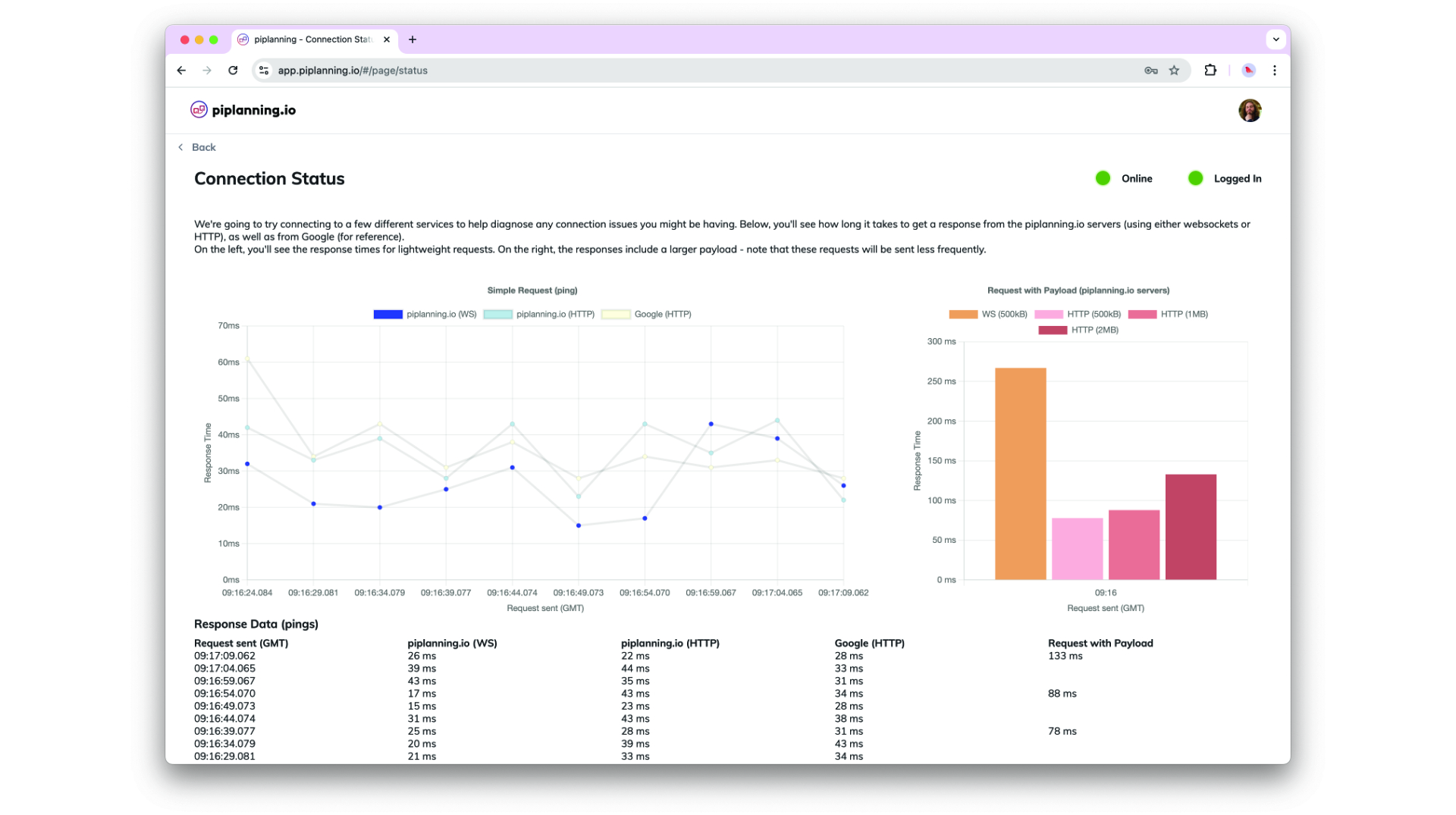
The Connection Status Page is designed to provide better insights and help diagnose connection issues more effectively.
Sep 2nd, 2024

Connection Status Page

The Connection Status Page is designed to provide better insights and help diagnose connection issues more effectively.
Sep 2nd, 2024

Board Activity Comparison for Sticky Notes

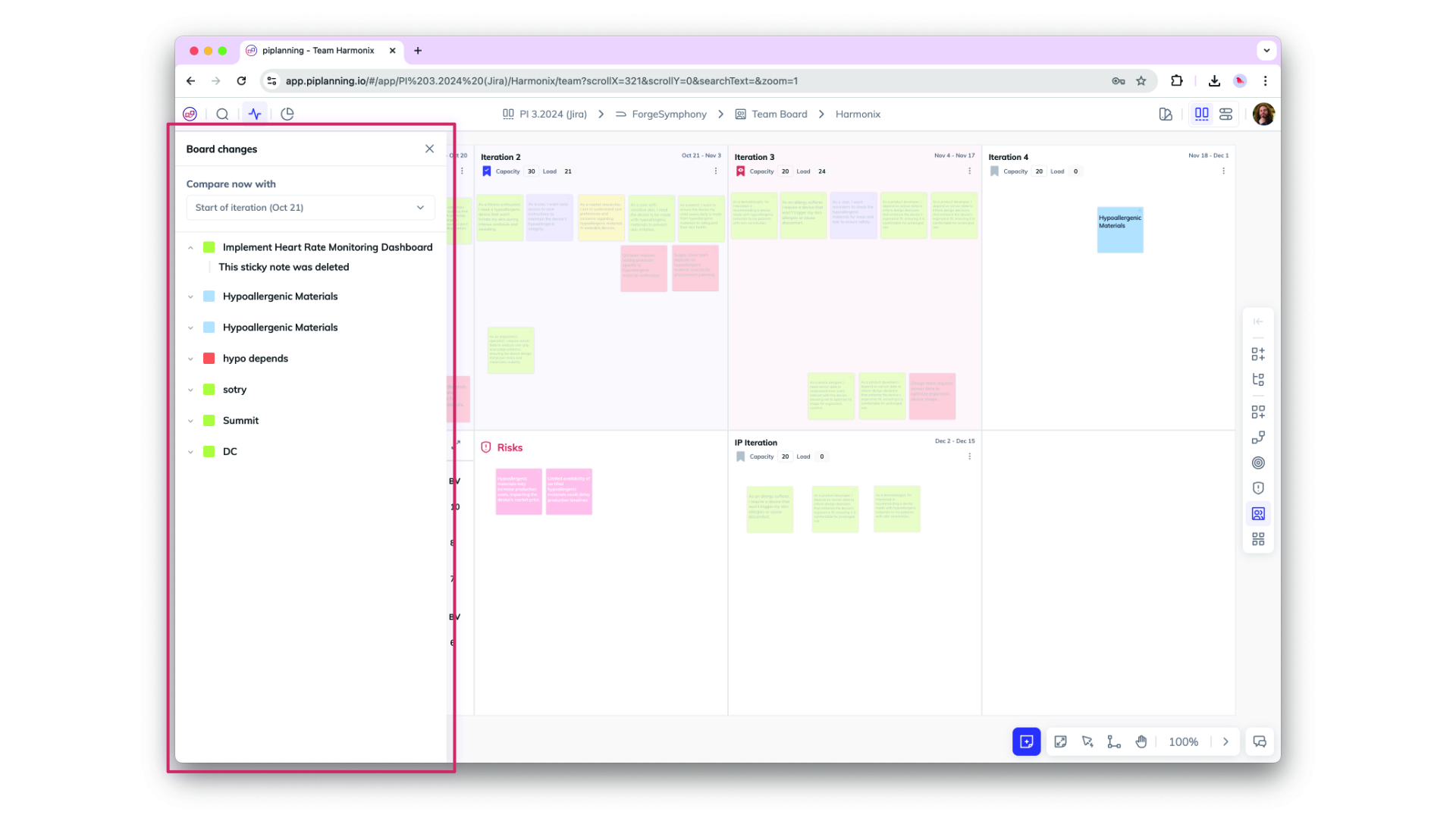
Easily track changes on sticky notes with the new Board Activity Compare feature. Compare any two points in time—such as Now vs. Last Workday, Now vs. Start of Iteration, or Now vs. Start of PI—to view updates on attributes and actions taken on each sticky note, providing clear insights into recent activity and progress.
Aug 29th, 2024

Board Activity Comparison for Sticky Notes

Easily track changes on sticky notes with the new Board Activity Compare feature. Compare any two points in time—such as Now vs. Last Workday, Now vs. Start of Iteration, or Now vs. Start of PI—to view updates on attributes and actions taken on each sticky note, providing clear insights into recent activity and progress.
Aug 29th, 2024

Assignee Field on Sticky Notes with Jira & Rally Sync

A new "Assignee" field on sticky notes now allows you to assign users directly within the app. The assignee syncs seamlessly with Jira and Rally, displaying user IDs and enabling easy edits. This update enhances collaboration by linking ALM user assignments to piplanning.io.
Aug 23rd, 2024

Assignee Field on Sticky Notes with Jira & Rally Sync

A new "Assignee" field on sticky notes now allows you to assign users directly within the app. The assignee syncs seamlessly with Jira and Rally, displaying user IDs and enabling easy edits. This update enhances collaboration by linking ALM user assignments to piplanning.io.
Aug 23rd, 2024

Accessibility Compliance Update: 508 & WCAG Level AA

piplanning.io is now fully compliant with Section 508 and WCAG 2.1 Level AA accessibility standards! This update ensures an improved experience for all users, including those with disabilities, by enhancing keyboard navigation, screen reader support, color contrast, and more.
Jul 22nd, 2024

Accessibility Compliance Update: 508 & WCAG Level AA

piplanning.io is now fully compliant with Section 508 and WCAG 2.1 Level AA accessibility standards! This update ensures an improved experience for all users, including those with disabilities, by enhancing keyboard navigation, screen reader support, color contrast, and more.
Jul 22nd, 2024

Profile menu

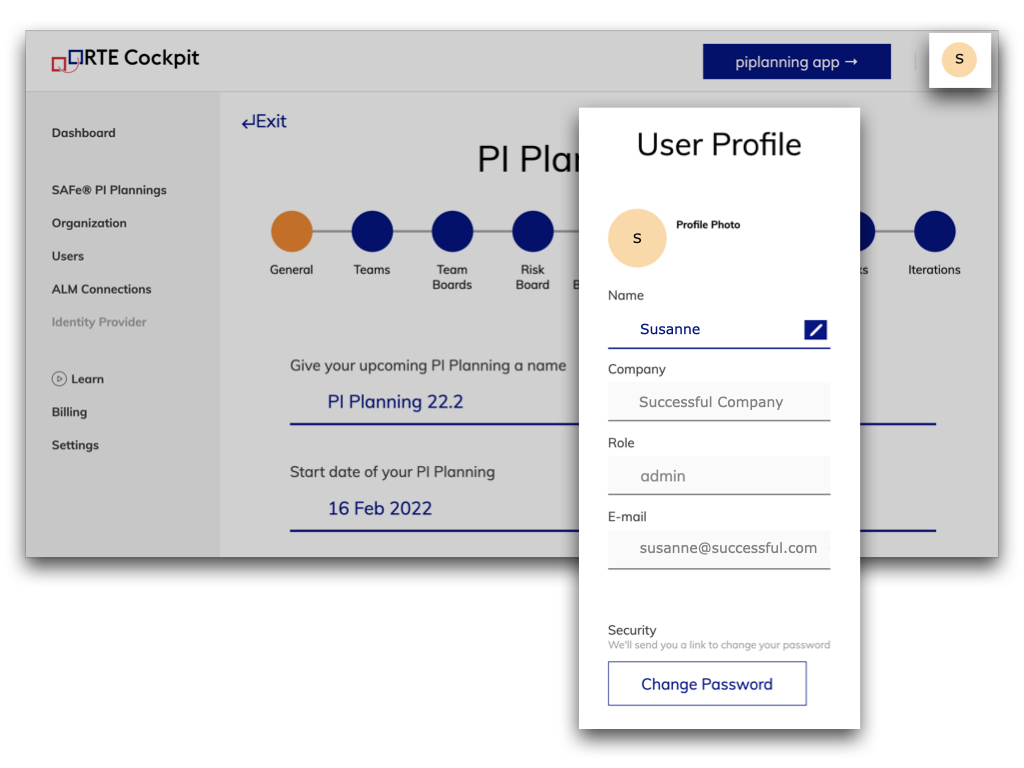
We added a Profile menu in the RTE Cockpit, where you can see some of your personal information. Here, you can change your name to the one you want your colleagues to call you. And here you can also change your password.
Feb 8th, 2022

Profile menu

We added a Profile menu in the RTE Cockpit, where you can see some of your personal information. Here, you can change your name to the one you want your colleagues to call you. And here you can also change your password.
Feb 8th, 2022

Archive session

It is possible to archive a PI Planning session. This allows you to cleanup the list of available sessions to choose for users in the app.
Jan 12th, 2022

Archive session

It is possible to archive a PI Planning session. This allows you to cleanup the list of available sessions to choose for users in the app.
Jan 12th, 2022

Forced login via SSO only is available

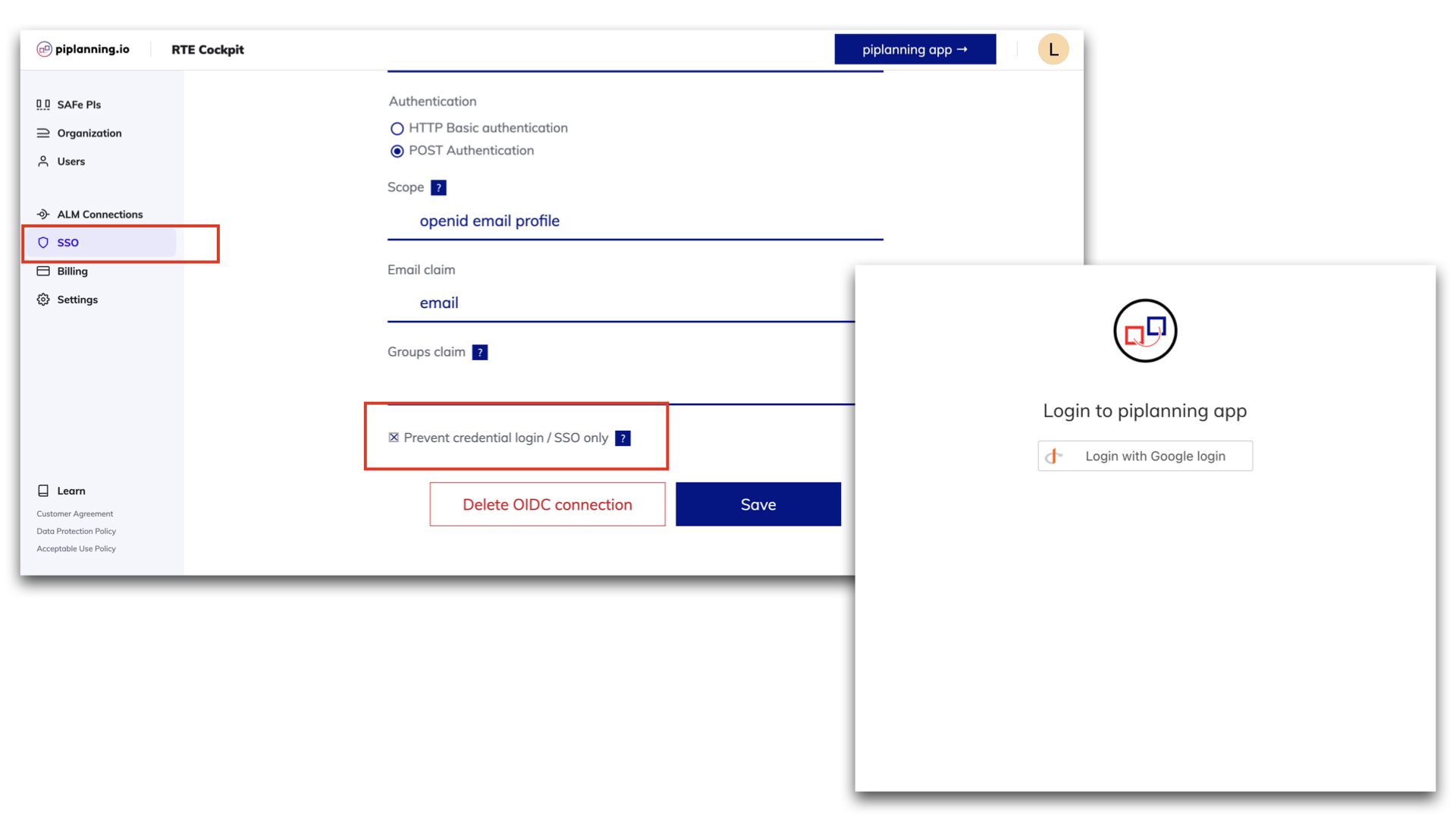
piplanning.io now allows you to force login via SSO only and prevent the usage of username and password for your users. This allows for secure, centralized and easy user access management. To do so you can check the box 'Prevent credential login / SSO only' on the IDP setup page.
Dec 16th, 2021

Forced login via SSO only is available

piplanning.io now allows you to force login via SSO only and prevent the usage of username and password for your users. This allows for secure, centralized and easy user access management. To do so you can check the box 'Prevent credential login / SSO only' on the IDP setup page.
Dec 16th, 2021

Allow spaces in team names

You can now enter the team names separated by a space in the Cockpit.
Sep 8th, 2021

Allow spaces in team names

You can now enter the team names separated by a space in the Cockpit.
Sep 8th, 2021

Import CSV with link

Now you can also use the CSV import to bring links between sticky notes with an ALM key to the Program Backlog Board and the Team Boards.
Aug 30th, 2021

Import CSV with link

Now you can also use the CSV import to bring links between sticky notes with an ALM key to the Program Backlog Board and the Team Boards.
Aug 30th, 2021

Assign ARTs to solution train

Under organization in the menu on the left you can now add your ARTs to a Solution under "Solution Trains".
Jul 23rd, 2021

Assign ARTs to solution train

Under organization in the menu on the left you can now add your ARTs to a Solution under "Solution Trains".
Jul 23rd, 2021

List of solution trains

If you click on “Organization” in the menu on the left side and then navigate to the tab "Solution Train" you will find a list of all your Solutions.
Jul 15th, 2021

List of solution trains

If you click on “Organization” in the menu on the left side and then navigate to the tab "Solution Train" you will find a list of all your Solutions.
Jul 15th, 2021

List of ARTs

If you click on “Organization” in the menu on the left side and then navigate to the tab "ARTs" you will find a list of all your ARTs.
Jul 8th, 2021

List of ARTs

If you click on “Organization” in the menu on the left side and then navigate to the tab "ARTs" you will find a list of all your ARTs.
Jul 8th, 2021

Shared sprints in Jira

Now it’s possible that you can use shared sprints. What does that mean? If you have one sprint configured in Jira but multiple teams use this one sprint you can now configure it with the new team-mapping field.
Jun 27th, 2021

Shared sprints in Jira

Now it’s possible that you can use shared sprints. What does that mean? If you have one sprint configured in Jira but multiple teams use this one sprint you can now configure it with the new team-mapping field.
Jun 27th, 2021

Redesigned ALM team mapping page

We optimized the way you can manage your teams under ALM team mapping. Now can edit team by team and this way you have a much better overview.
May 18th, 2021

Redesigned ALM team mapping page

We optimized the way you can manage your teams under ALM team mapping. Now can edit team by team and this way you have a much better overview.
May 18th, 2021

Release version 2.18.0

This release includes all the features from previous Cloud releases.
Nov 20th, 2024

Release version 2.18.0

This release includes all the features from previous Cloud releases.
Nov 20th, 2024

Release version 2.17.0

This release includes all the features from previous Cloud releases.
Jun 25th, 2024

Release version 2.17.0

This release includes all the features from previous Cloud releases.
Jun 25th, 2024

Release version 2.16.0

This release includes all the features from previous Cloud releases.
May 16th, 2024

Release version 2.16.0

This release includes all the features from previous Cloud releases.
May 16th, 2024

Release version 2.15.0

This release includes all the features from previous Cloud releases.
Feb 6th, 2024

Release version 2.15.0

This release includes all the features from previous Cloud releases.
Feb 6th, 2024

Release version 2.14.0

This release includes all the features from previous Cloud releases.
May 24th, 2023

Release version 2.14.0

This release includes all the features from previous Cloud releases.
May 24th, 2023

Release version 2.12

This release includes all the features from previous Cloud releases.
Feb 16th, 2022

Release version 2.12

This release includes all the features from previous Cloud releases.
Feb 16th, 2022

Release version 2.11

This release includes all the features from previous Cloud releases.
Dec 28th, 2021

Release version 2.11

This release includes all the features from previous Cloud releases.
Dec 28th, 2021

Release version 2.10

This release includes all the features from previous Cloud releases.
Nov 17th, 2021

Release version 2.10

This release includes all the features from previous Cloud releases.
Nov 17th, 2021

Release version 2.9

This release includes all the features from previous Cloud releases.
Jul 7th, 2021

Release version 2.9

This release includes all the features from previous Cloud releases.
Jul 7th, 2021

Release version 2.3

This release includes all the features from previous Cloud releases.
May 19th, 2021

Release version 2.3

This release includes all the features from previous Cloud releases.
May 19th, 2021