Releases

We're constantly improving piplanning.io. Browse the complete history of updates, enhancements, and new features across all past releases.
Filter by topic:

Removed arrange button

The arrange button has been removed from the navigation bar. This function can be accessed by clicking on the three dots or by right-clicking on the mouse in each iteration.
Feb 7th, 2022

Removed arrange button

The arrange button has been removed from the navigation bar. This function can be accessed by clicking on the three dots or by right-clicking on the mouse in each iteration.
Feb 7th, 2022

Global search

From now on, when you type in the search bar, the items matching your search will be automatically listed. This is also true if you search for stickers or teams. If nothing is entered, all items will be listed.
Jan 20th, 2022

Global search

From now on, when you type in the search bar, the items matching your search will be automatically listed. This is also true if you search for stickers or teams. If nothing is entered, all items will be listed.
Jan 20th, 2022

Newly optimized context menu

We've restructured the functions to make it easier to see which ones apply to the whole board or specifically to the part you clicked on.
Jan 19th, 2022

Newly optimized context menu

We've restructured the functions to make it easier to see which ones apply to the whole board or specifically to the part you clicked on.
Jan 19th, 2022

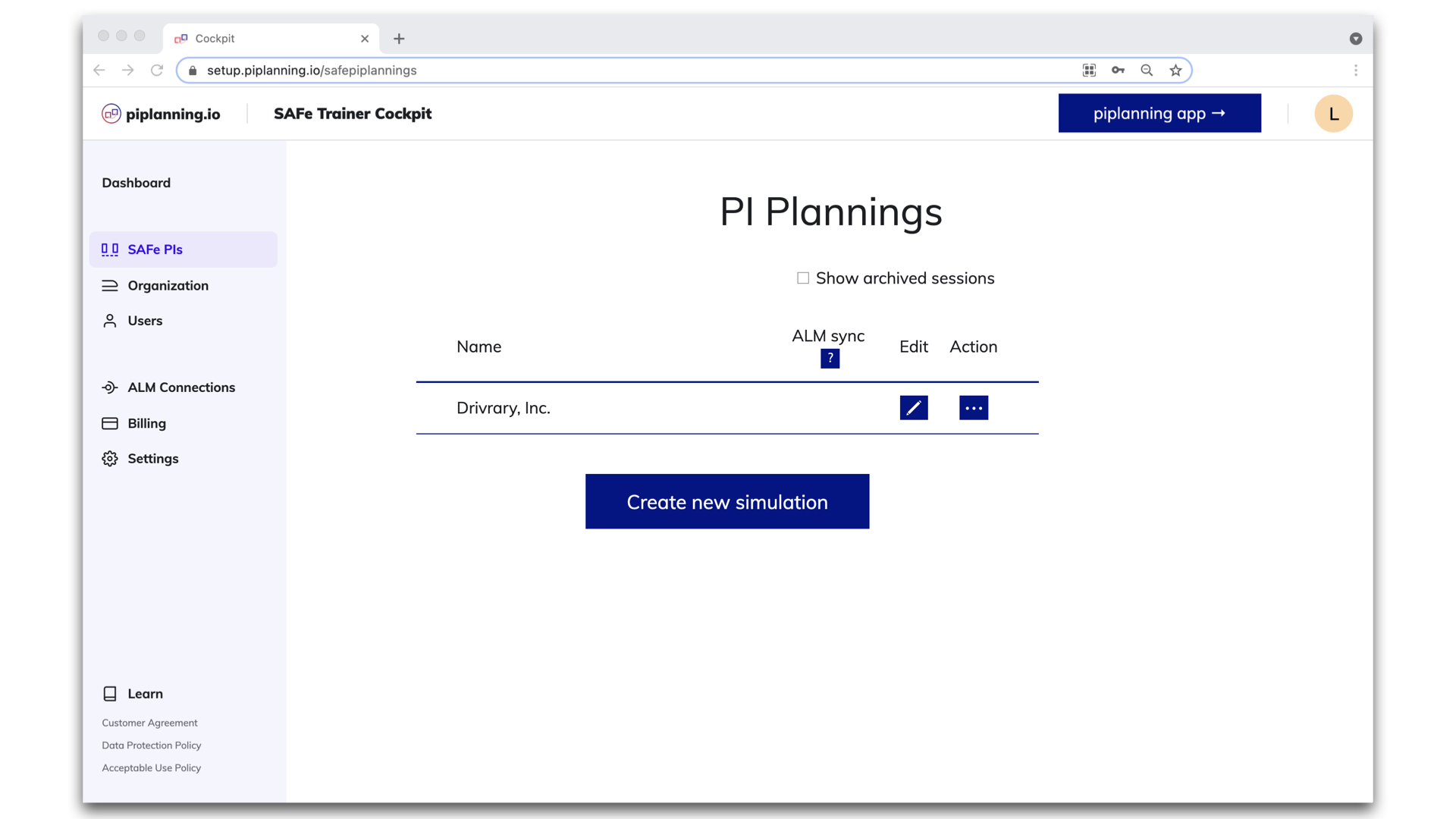
Archive session

It is possible to archive a PI Planning session. This allows you to cleanup the list of available sessions to choose for users in the app.
Jan 12th, 2022

Archive session

It is possible to archive a PI Planning session. This allows you to cleanup the list of available sessions to choose for users in the app.
Jan 12th, 2022

Release version 2.11

This release includes all the features from previous Cloud releases.
Dec 28th, 2021

Release version 2.11

This release includes all the features from previous Cloud releases.
Dec 28th, 2021

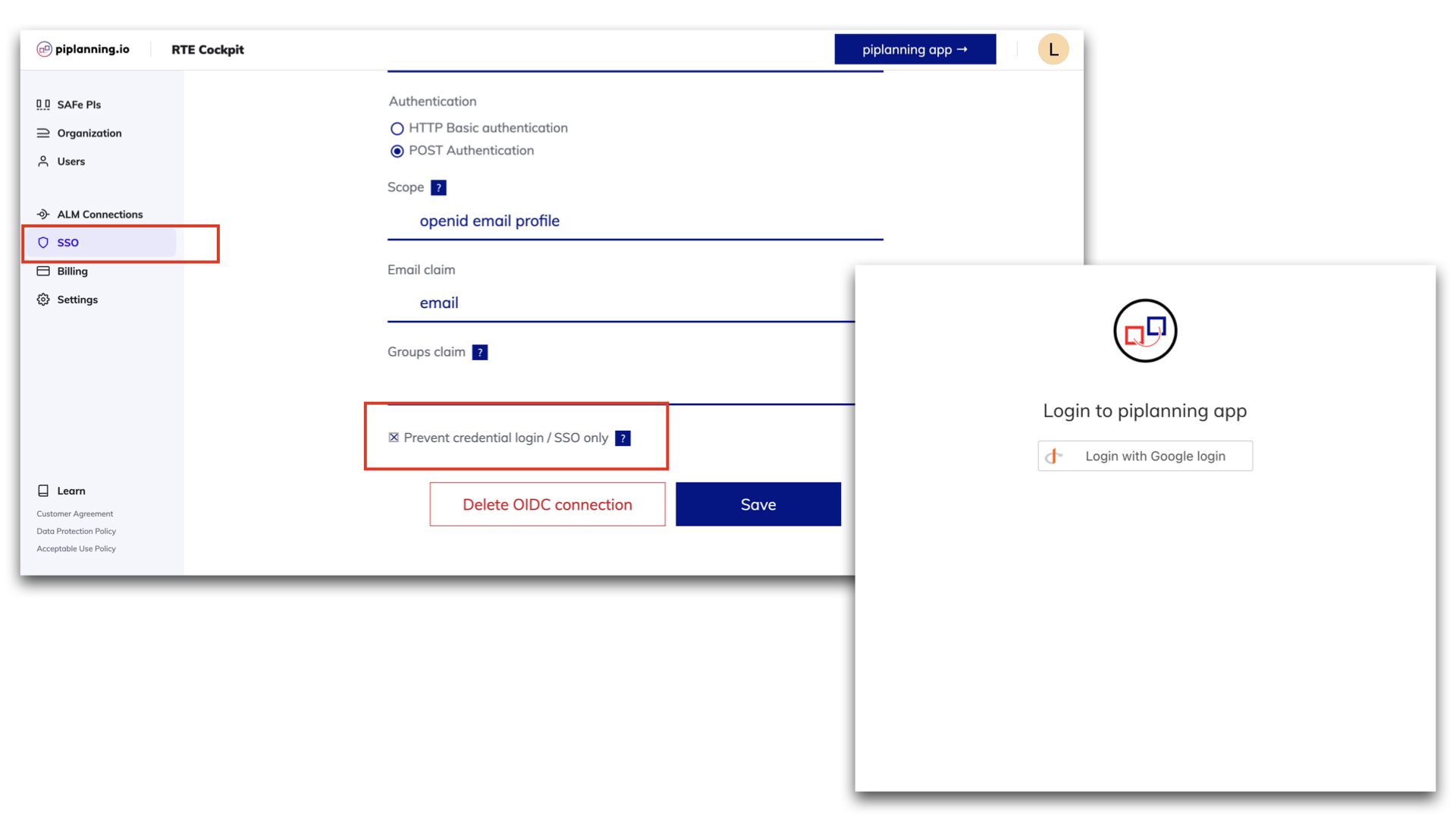
Forced login via SSO only is available

piplanning.io now allows you to force login via SSO only and prevent the usage of username and password for your users. This allows for secure, centralized and easy user access management. To do so you can check the box 'Prevent credential login / SSO only' on the IDP setup page.
Dec 16th, 2021

Forced login via SSO only is available

piplanning.io now allows you to force login via SSO only and prevent the usage of username and password for your users. This allows for secure, centralized and easy user access management. To do so you can check the box 'Prevent credential login / SSO only' on the IDP setup page.
Dec 16th, 2021

Load vs. capacity overview

In this newly available report, you can get feedback on the load of the iterations to see the status of your planning. The color of the bar helps you get a quick overview: blue indicates that the load is fine, orange is a warning and red is an overload. To do this, click on the pie chart in the upper right corner of any iteration and select the Load vs. Capacity tab.
Nov 30th, 2021

Load vs. capacity overview

In this newly available report, you can get feedback on the load of the iterations to see the status of your planning. The color of the bar helps you get a quick overview: blue indicates that the load is fine, orange is a warning and red is an overload. To do this, click on the pie chart in the upper right corner of any iteration and select the Load vs. Capacity tab.
Nov 30th, 2021

Risky links

You can now see on the Program Board and Team Board the risky links where the dependency is planned to be delivered in the same iteration or a later one than the feature. A notification will appear in the bottom right corner and disappears as soon as the risky link is resolved.
Nov 18th, 2021

Risky links

You can now see on the Program Board and Team Board the risky links where the dependency is planned to be delivered in the same iteration or a later one than the feature. A notification will appear in the bottom right corner and disappears as soon as the risky link is resolved.
Nov 18th, 2021

Release version 2.10

This release includes all the features from previous Cloud releases.
Nov 17th, 2021

Release version 2.10

This release includes all the features from previous Cloud releases.
Nov 17th, 2021

Allow spaces in team names

You can now enter the team names separated by a space in the Cockpit.
Sep 8th, 2021

Allow spaces in team names

You can now enter the team names separated by a space in the Cockpit.
Sep 8th, 2021

Import CSV with link

Now you can also use the CSV import to bring links between sticky notes with an ALM key to the Program Backlog Board and the Team Boards.
Aug 30th, 2021

Import CSV with link

Now you can also use the CSV import to bring links between sticky notes with an ALM key to the Program Backlog Board and the Team Boards.
Aug 30th, 2021

Kanban Mode

Kanban support has arrived in Execution Mode, making Agile collaboration more seamless than ever. This new feature allows teams to start managing their work in a fully Jira-synced Kanban board.
Mar 19th, 2025

Kanban Mode

Kanban support has arrived in Execution Mode, making Agile collaboration more seamless than ever. This new feature allows teams to start managing their work in a fully Jira-synced Kanban board.
Mar 19th, 2025

Pan Mode & New Utilities

You’ll find the Utilities menu in the lower-right corner, making key board functions like adding sticky notes, scaling, zooming, and the new Pan Mode easier to access. With Pan Mode, effortlessly navigate your board using the hand icon or by holding the spacebar and dragging. Selecting multiple sticky notes is now smoother, too. Plus, the Plan vs. Execution switch is now right next to your profile for quicker toggling.
Feb 28th, 2025

Pan Mode & New Utilities

You’ll find the Utilities menu in the lower-right corner, making key board functions like adding sticky notes, scaling, zooming, and the new Pan Mode easier to access. With Pan Mode, effortlessly navigate your board using the hand icon or by holding the spacebar and dragging. Selecting multiple sticky notes is now smoother, too. Plus, the Plan vs. Execution switch is now right next to your profile for quicker toggling.
Feb 28th, 2025

Org View and Session change

Clicking on the logo in the top navgiation opens your org structure and allows you to switch easily your PI sessions
Dec 10th, 2024

Org View and Session change

Clicking on the logo in the top navgiation opens your org structure and allows you to switch easily your PI sessions
Dec 10th, 2024

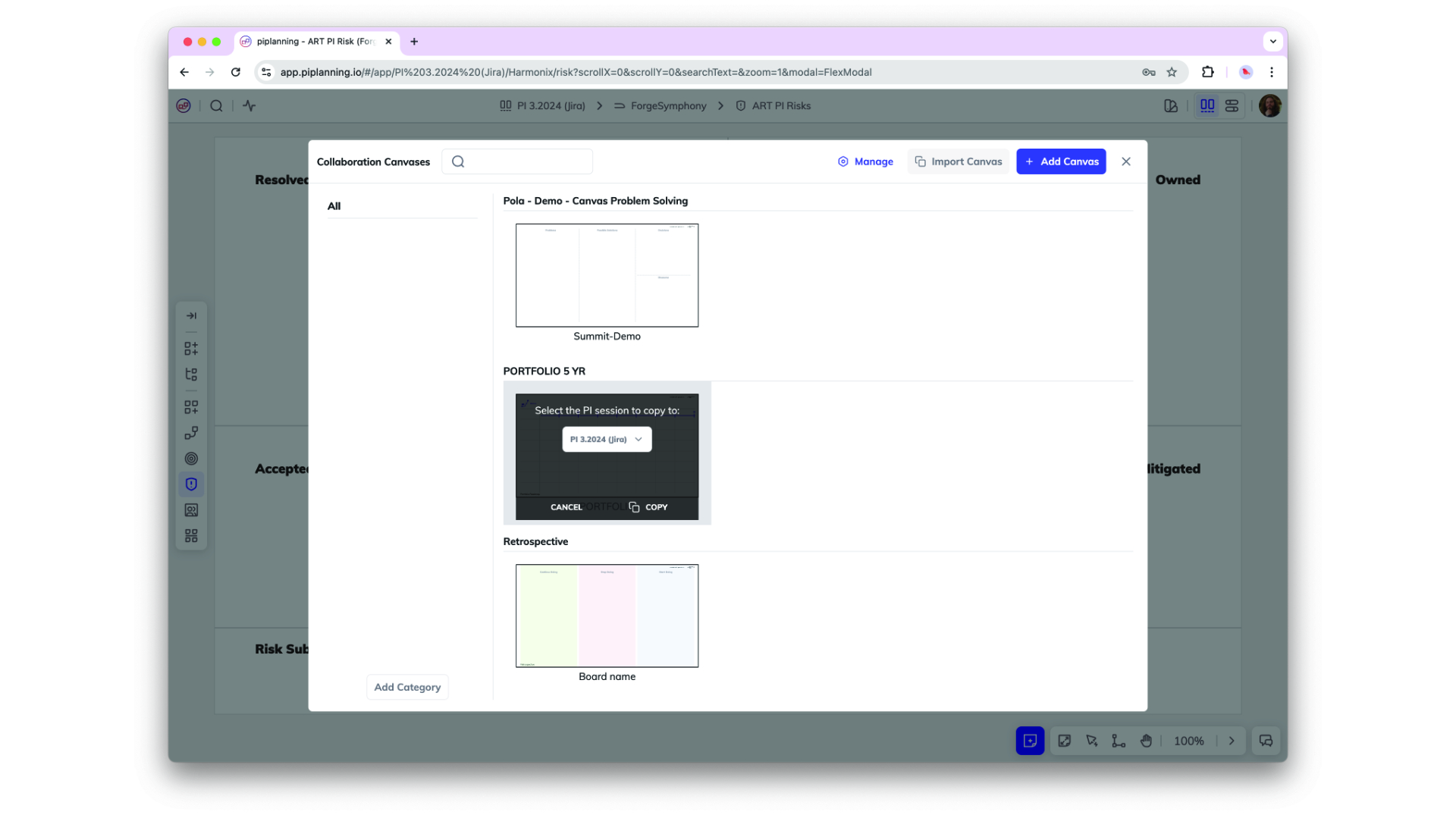
Copy Canvases

Canvases can now be copied from one session to another. That allows you to create templates and re-use them in future PI sessions.
Nov 25th, 2024

Copy Canvases

Canvases can now be copied from one session to another. That allows you to create templates and re-use them in future PI sessions.
Nov 25th, 2024

Assignee on Risk Board

You can now assign work items on a risk board to a person.
Nov 21st, 2024

Assignee on Risk Board

You can now assign work items on a risk board to a person.
Nov 21st, 2024

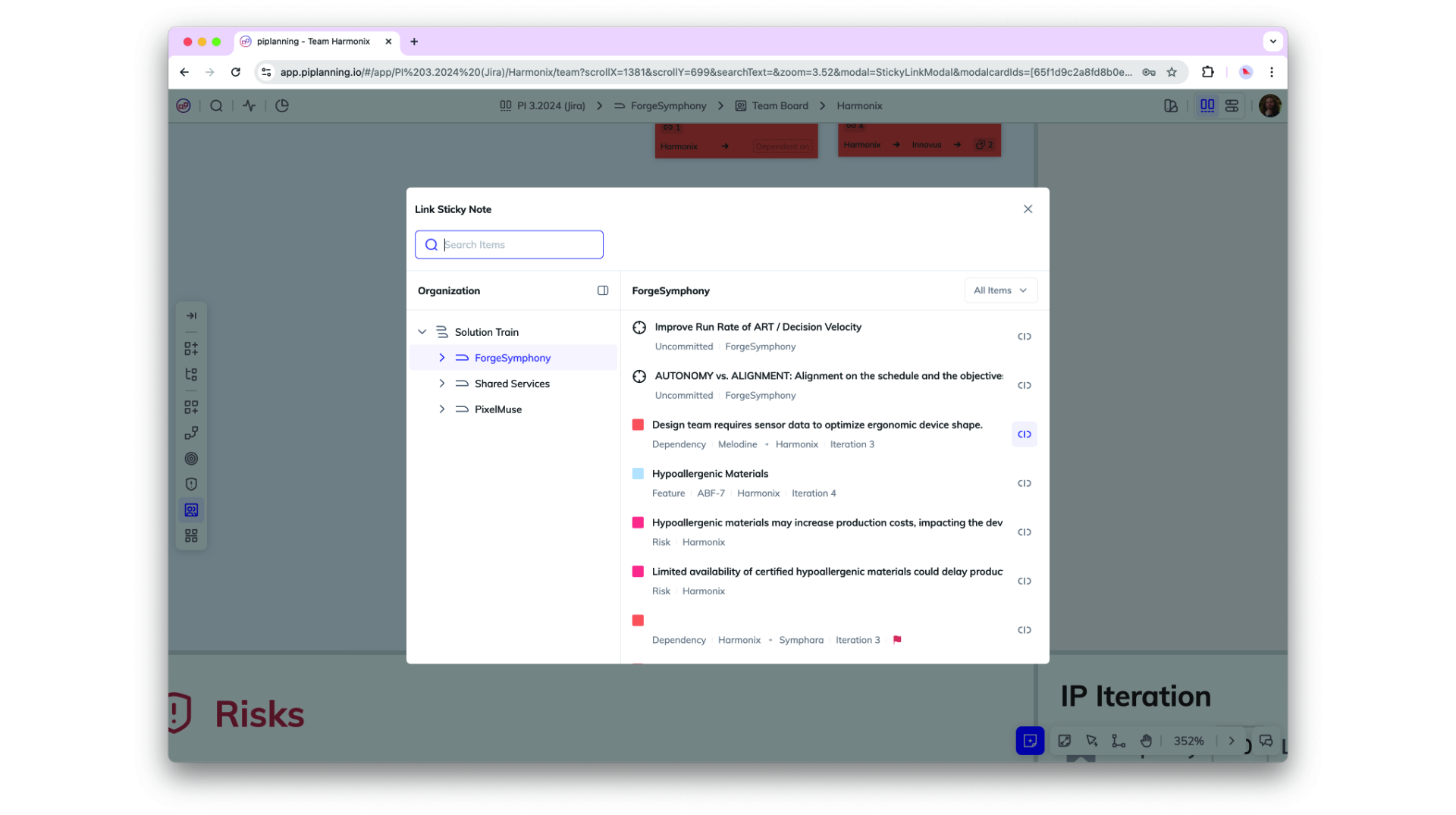
Sticky Linking and Search Capabilities

You can now link any sticky note to another within the same PI session, allowing for better cross-team and cross-ART (Agile Release Train) collaboration. Easily link stories within or across teams, as well as to features in other ARTs, with an improved UI that includes team and type filtering plus full-text search for streamlined navigation.
Oct 2nd, 2024

Sticky Linking and Search Capabilities

You can now link any sticky note to another within the same PI session, allowing for better cross-team and cross-ART (Agile Release Train) collaboration. Easily link stories within or across teams, as well as to features in other ARTs, with an improved UI that includes team and type filtering plus full-text search for streamlined navigation.
Oct 2nd, 2024

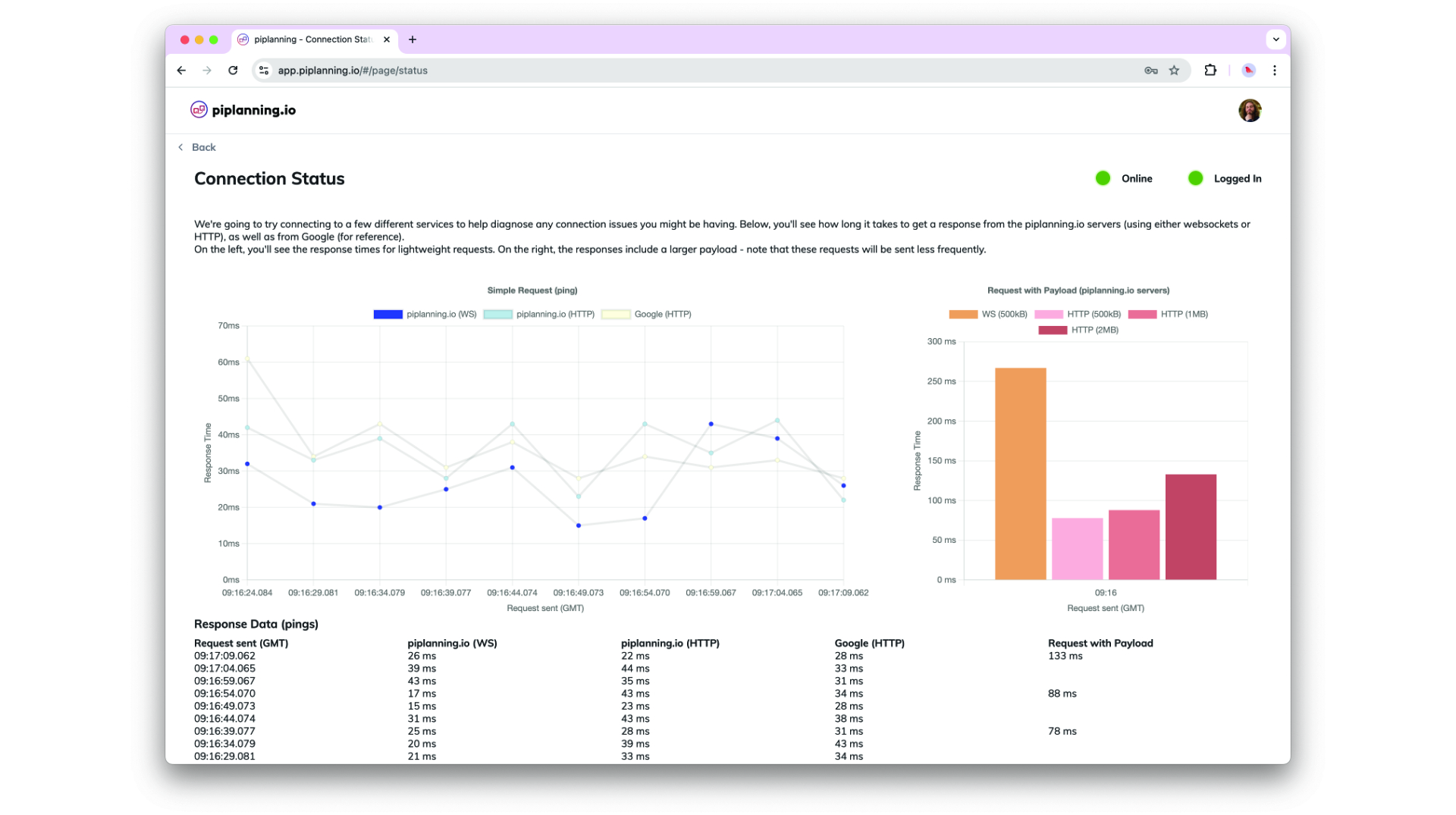
Connection Status Page

The Connection Status Page is designed to provide better insights and help diagnose connection issues more effectively.
Sep 2nd, 2024

Connection Status Page

The Connection Status Page is designed to provide better insights and help diagnose connection issues more effectively.
Sep 2nd, 2024

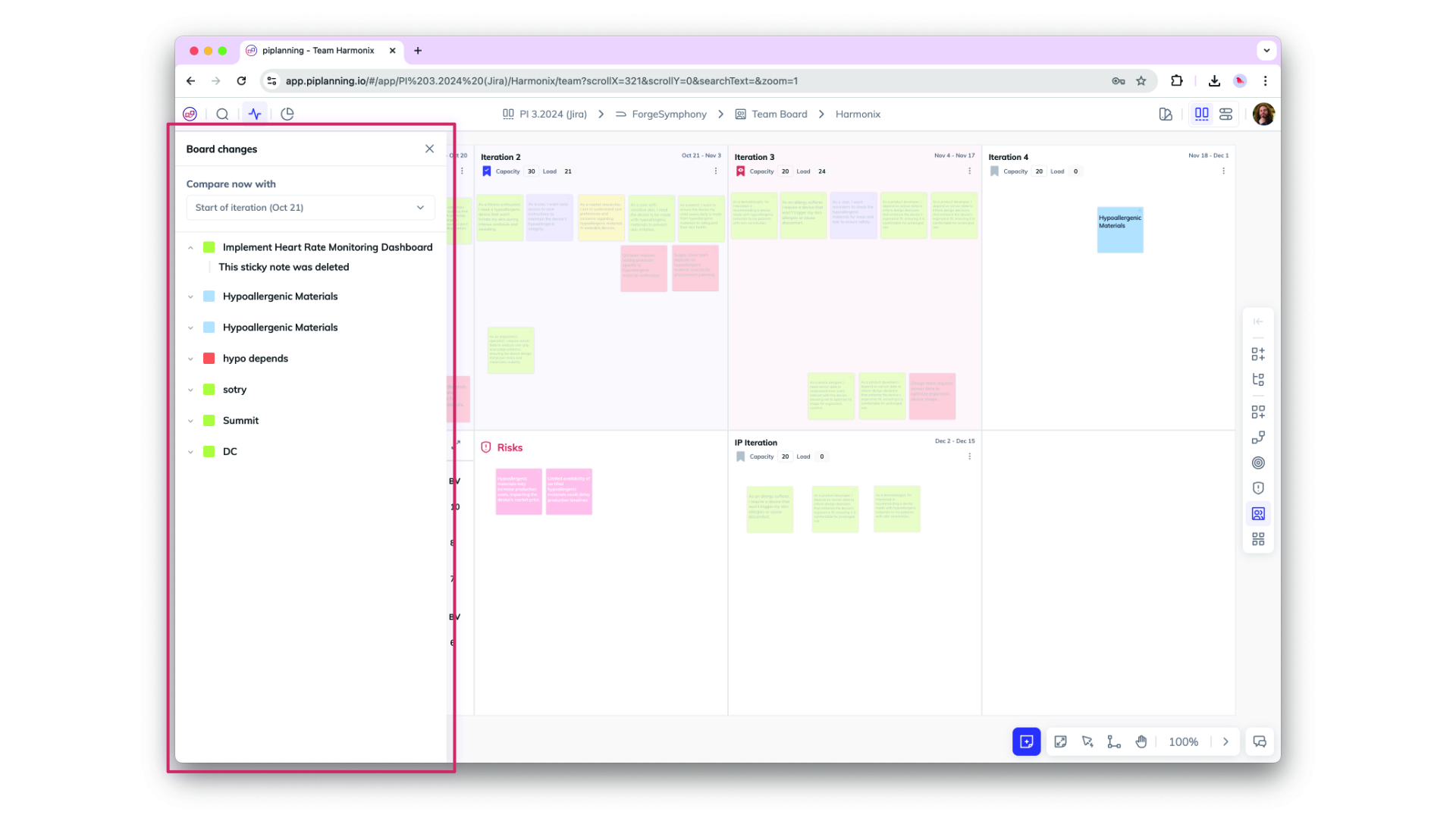
Board Activity Comparison for Sticky Notes

Easily track changes on sticky notes with the new Board Activity Compare feature. Compare any two points in time—such as Now vs. Last Workday, Now vs. Start of Iteration, or Now vs. Start of PI—to view updates on attributes and actions taken on each sticky note, providing clear insights into recent activity and progress.
Aug 29th, 2024

Board Activity Comparison for Sticky Notes

Easily track changes on sticky notes with the new Board Activity Compare feature. Compare any two points in time—such as Now vs. Last Workday, Now vs. Start of Iteration, or Now vs. Start of PI—to view updates on attributes and actions taken on each sticky note, providing clear insights into recent activity and progress.
Aug 29th, 2024

Assignee Field on Sticky Notes with Jira & Rally Sync

A new "Assignee" field on sticky notes now allows you to assign users directly within the app. The assignee syncs seamlessly with Jira and Rally, displaying user IDs and enabling easy edits. This update enhances collaboration by linking ALM user assignments to piplanning.io.
Aug 23rd, 2024

Assignee Field on Sticky Notes with Jira & Rally Sync

A new "Assignee" field on sticky notes now allows you to assign users directly within the app. The assignee syncs seamlessly with Jira and Rally, displaying user IDs and enabling easy edits. This update enhances collaboration by linking ALM user assignments to piplanning.io.
Aug 23rd, 2024

Accessibility Compliance Update: 508 & WCAG Level AA

piplanning.io is now fully compliant with Section 508 and WCAG 2.1 Level AA accessibility standards! This update ensures an improved experience for all users, including those with disabilities, by enhancing keyboard navigation, screen reader support, color contrast, and more.
Jul 22nd, 2024

Accessibility Compliance Update: 508 & WCAG Level AA

piplanning.io is now fully compliant with Section 508 and WCAG 2.1 Level AA accessibility standards! This update ensures an improved experience for all users, including those with disabilities, by enhancing keyboard navigation, screen reader support, color contrast, and more.
Jul 22nd, 2024

Support for New Parent-Child Link Type in Jira

piplanning.io now fully supports Jira's new "parent/child" link type, allowing admins to configure this standardized way of linking Features, User Stories, and other work items. This update streamlines project setup, enhances linking in the RTE Cockpit, and ensures a smooth experience for customers using the Jira Integration.
May 17th, 2024

Support for New Parent-Child Link Type in Jira

piplanning.io now fully supports Jira's new "parent/child" link type, allowing admins to configure this standardized way of linking Features, User Stories, and other work items. This update streamlines project setup, enhances linking in the RTE Cockpit, and ensures a smooth experience for customers using the Jira Integration.
May 17th, 2024

Enhanced PI Admin Capabilities

As a PI Admin, you now have the ability to add and edit team members, as well as manage teams within your Agile Release Train.
Mar 20th, 2024

Enhanced PI Admin Capabilities

As a PI Admin, you now have the ability to add and edit team members, as well as manage teams within your Agile Release Train.
Mar 20th, 2024

Enhanced Session Duplication Options

Prepare New PI: Retain the original PI configuration while updating teams, iteration names, and mappings. Duplicate This PI: Create a copy of the PI with the option to update team compositions, typically used when teams change before PI Planning begins.
Mar 18th, 2024

Enhanced Session Duplication Options

Prepare New PI: Retain the original PI configuration while updating teams, iteration names, and mappings. Duplicate This PI: Create a copy of the PI with the option to update team compositions, typically used when teams change before PI Planning begins.
Mar 18th, 2024

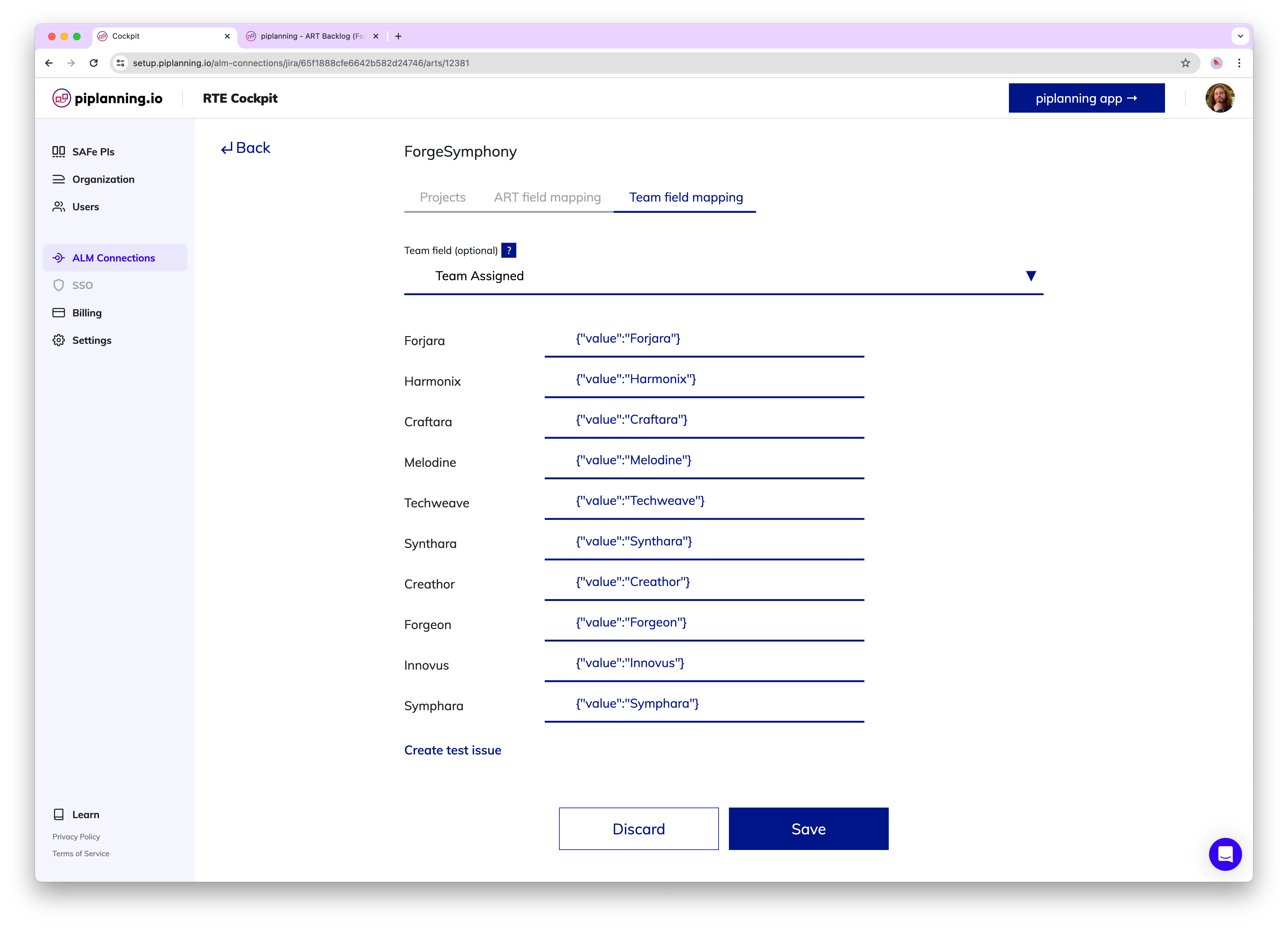
Default Jira Team Field – now supported for mapping

Jira users can now use the out of the box Jira team field for mapping team and ART level items.
Feb 21st, 2024

Default Jira Team Field – now supported for mapping

Jira users can now use the out of the box Jira team field for mapping team and ART level items.
Feb 21st, 2024

Automate Backlog Board item mirroring to Team Board

Automatically mirror Backlog Board items onto the Team Board when the team is assigned. This can easily be done in the RTE Cockpit by ticking the relevant box located under the ART Backlog Board.
Apr 26th, 2023

Automate Backlog Board item mirroring to Team Board

Automatically mirror Backlog Board items onto the Team Board when the team is assigned. This can easily be done in the RTE Cockpit by ticking the relevant box located under the ART Backlog Board.
Apr 26th, 2023

New PI Admin Role

Within this new role, known as the PI Admin, individuals are granted access to the RTE Cockpit. They assume the responsibility of managing teams within their ART and Solution Trains, including the ability to add new team members. Moreover, they are entrusted with overseeing PI sessions in which they are actively involved as part of their Teams.
Apr 19th, 2023

New PI Admin Role

Within this new role, known as the PI Admin, individuals are granted access to the RTE Cockpit. They assume the responsibility of managing teams within their ART and Solution Trains, including the ability to add new team members. Moreover, they are entrusted with overseeing PI sessions in which they are actively involved as part of their Teams.
Apr 19th, 2023

Available languages: English, Spanish, Japanese

In addition to English, you can now set Spanish or Japanese as your preferred language. Choose the language under your profile.
Dec 14th, 2022

Available languages: English, Spanish, Japanese

In addition to English, you can now set Spanish or Japanese as your preferred language. Choose the language under your profile.
Dec 14th, 2022

Improved ALM troubleshooting

Lately, we added additional tools to help you to troubleshoot ALM connectivity issues. This allows you to narrow down the problem with your stuck Jira or ADO sync faster than ever before. We highlight connection issues for each PI Planning session and provide a detailed log for each ALM connection.
May 25th, 2022

Improved ALM troubleshooting

Lately, we added additional tools to help you to troubleshoot ALM connectivity issues. This allows you to narrow down the problem with your stuck Jira or ADO sync faster than ever before. We highlight connection issues for each PI Planning session and provide a detailed log for each ALM connection.
May 25th, 2022

Redesigned RTE Cockpit navigation

You can enjoy new navigation in the RTE Cockpit. The menu got a cool design and the footer has been removed. We love it!
Feb 15th, 2022

Redesigned RTE Cockpit navigation

You can enjoy new navigation in the RTE Cockpit. The menu got a cool design and the footer has been removed. We love it!
Feb 15th, 2022

PI session name in title

When you edit a session, you know which one you're editing because the session name in the title is always visible whichever settings menu you are editing.
Feb 9th, 2022

PI session name in title

When you edit a session, you know which one you're editing because the session name in the title is always visible whichever settings menu you are editing.
Feb 9th, 2022

Release version 2.18.0

This release includes all the features from previous Cloud releases.
Nov 20th, 2024

Release version 2.18.0

This release includes all the features from previous Cloud releases.
Nov 20th, 2024

Release version 2.17.0

This release includes all the features from previous Cloud releases.
Jun 25th, 2024

Release version 2.17.0

This release includes all the features from previous Cloud releases.
Jun 25th, 2024

Release version 2.16.0

This release includes all the features from previous Cloud releases.
May 16th, 2024

Release version 2.16.0

This release includes all the features from previous Cloud releases.
May 16th, 2024

Release version 2.15.0

This release includes all the features from previous Cloud releases.
Feb 6th, 2024

Release version 2.15.0

This release includes all the features from previous Cloud releases.
Feb 6th, 2024

Release version 2.14.0

This release includes all the features from previous Cloud releases.
May 24th, 2023

Release version 2.14.0

This release includes all the features from previous Cloud releases.
May 24th, 2023

Release version 2.12

This release includes all the features from previous Cloud releases.
Feb 16th, 2022

Release version 2.12

This release includes all the features from previous Cloud releases.
Feb 16th, 2022

Release version 2.11

This release includes all the features from previous Cloud releases.
Dec 28th, 2021

Release version 2.11

This release includes all the features from previous Cloud releases.
Dec 28th, 2021

Release version 2.10

This release includes all the features from previous Cloud releases.
Nov 17th, 2021

Release version 2.10

This release includes all the features from previous Cloud releases.
Nov 17th, 2021

Release version 2.9

This release includes all the features from previous Cloud releases.
Jul 7th, 2021

Release version 2.9

This release includes all the features from previous Cloud releases.
Jul 7th, 2021

Release version 2.3

This release includes all the features from previous Cloud releases.
May 19th, 2021

Release version 2.3

This release includes all the features from previous Cloud releases.
May 19th, 2021